Showing posts with label Laptop. Show all posts

Sunday, December 12

MacBook


MacBook white.png   

The MacBook is a brand of Macintosh notebook computers built by Apple Inc. First introduced in May 2006, it replaced the iBook and 12-inch PowerBook series of notebooks as a part of the Apple–Intel transition. Positioned as the low end of the MacBook family, the MacBook is aimed at the consumer and education markets. It is the best-selling Macintosh in history, and according to the sales-research organization NPD Group in October 2008, the mid-range model of the MacBook was the single best-selling laptop of any brand in U.S. retail stores for the preceding five months.
There have been three separate designs of the MacBook: the original model uses a combination of polycarbonate and fibreglass casing that was modelled after the iBook G4. The second type, introduced in October 2008 alongside the 15-inch MacBook Pro, used a similar unibody aluminum casing to the 15-inch Pro, and was updated and rebranded as the 13-inch MacBook Pro at the 2009 Apple Worldwide Developers Conference in June 2009. A third design, introduced in October 2009, uses a unibody polycarbonate shell as aluminum is now reserved for the higher-end MacBook Pro.

Original discrete polycarbonate model
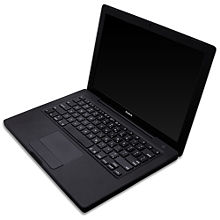
First-generation black polycarbonate MacBook, 2006
The original MacBook, available in black and white cases, was released on May 16, 2006, and used the Intel Core Duo processor and 945GM chipset, with Intel's GMA 950 integrated graphics on a 667 MHz front side bus. Later revisions of the MacBook moved to the Core 2 Duo processor and the GM965 chipset, with Intel's GMA X3100 integrated graphics on an 800 MHz system bus. Sale of the black polycarbonate MacBook ceased in October 2008 after the introduction of the aluminum MacBook.
While thinner than the iBook G4 that it replaced, the MacBook was wider than the 12-inch model due to its widescreen display. In addition, the MacBook was one of the first (the first being the MacBook Pro) to adopt Apple's MagSafe power connector and it replaced the iBook's mini-VGA display port with a mini-DVI display port. The iBook's discrete graphics chip was initially replaced by an integrated Intel GMA solution, though the latest revisions of the MacBook were upgraded with the more powerful Nvidia GeForce 320M.
While the MacBook Pro largely followed the industrial design standard set by the PowerBook G4, the MacBook was Apple's first notebook to use features now standard in its notebooks: the glossy display, the sunken keyboard design, and the non-mechanical magnetic latch. With the late 2007 revision, the keyboard received several changes to closely mirror the one that shipped with the iMac, by adding the same keyboard shortcut to control multimedia, and removing the embedded virtual numeric keypad and the Apple logo from the command keys.
Also offered in a more expensive black model until the introduction of the later unibody aluminum MacBook, the polycarbonate MacBook was the only Macintosh notebook to be offered in more than one color since the iBook G3 (Clamshell).


Ports
The ports are all on the left edge; on early models, from front to back, they are: Kensington Security Slot, audio in/out, two USB 2.0 ports, FireWire 400, mini-DVI, Gigabit Ethernet, MagSafe power connector.
The front edge features a pill-shaped power light and a round black infrared receiver, for Apple Remote; the right edge features only the disc slot.


User serviceability
The polycarbonate Intel MacBook is easier for users to fix or upgrade than its predecessor. Where the iBook required substantial disassembly to access most internal components, including removal of the keyboard and RAM, users need only to remove the polycarbonate MacBook's outer shell to access almost any interior component. Replacing the hard drive and memory requires merely the removal of the battery, and Apple provides do-it-yourself manuals for these tasks.


Quality problems
Some early polycarbonate MacBook models suffered from random shutdowns, occurring to owners who have owned their MacBooks for some amount of time. They were resolved through replacement of the CPU heatsink and firmware updates.
There were also cases reported of discolored or chipping palmrests. There were many instances of the edges of the palm rest and screen bezel splitting and thin strips peeling off. In such cases, Apple asked affected owners to contact AppleCare.
There were problems with batteries on some models from 2007 not being read by the MacBook. This is caused by a logicboard fault and not a fault with the battery.
In February 2010, Apple announced a warranty extension and recall for MacBooks bought between 2006–2007 for hard drive issues. This is caused by heat and other problems.


Model specifications
Table of models
Component Intel Core Duo Intel Core 2 Duo
Model Early 2006 Late 2006 Mid 2007 Late 2007 Early 2008 Late 2008
(White) Early 2009 (White) Mid 2009
Release date
May 16, 2006 November 8, 2006 May 15, 2007 November 1, 2007 February 26, 2008 October 14, 2008 January 21, 2009 May 27, 2009
Model numbers MA254*/A MA255*/A MA472*/A MA699*/A MA700*/A MA701*/A MB061*/A MB062*/A MB063*/A MB061*/B MB062*/B MB063*/B MB402*/A MB403*/A MB404*/A MB402*/B MB881*/A MC240*/A
Machine model MacBook1,1 MacBook2,1 MacBook3,1 MacBook4,1 MacBook4,2 MacBook5,2 MacBook5,2
Display 13.3-inch glossy widescreen LCD, 1280 x 800 pixel resolution (WXGA, 16:10 = 8:5 aspect ratio)
Front side bus 667 MHz 800 MHz 1066 MHz
Processor 1.83 GHz or 2.0 GHz
Intel Core Duo (T2400/T2500) 1.83 GHz or 2.0 GHz
Intel Core 2 Duo (T5600/T7200) 2.0 GHz or 2.16 GHz
Intel Core 2 Duo (T7200/T7400) 2.0 GHz or 2.2 GHz
Intel Core 2 Duo (T7300/T7500) 2.1 GHz or 2.4 GHz
Intel Core 2 Duo (T8100/T8300) 2.1 GHz
Intel Core 2 Duo (T8100) 2.0 GHz
Intel Core 2 Duo (P7350) 2.13 GHz
Intel Core 2 Duo (P7450)
Memory
Two slots for
DDR2 SDRAM 512 MB (two 256 MB) 667 MHz PC2-5300
Expandable to 2 GB 512 MB (two 256 MB) or 1 GB (two 512 MB) 667 MHz PC2-5300
Expandable to 2 GB5 1 GB (two 512 MB) 667 MHz PC2-5300
Expandable to 2 GB5 1 GB (two 512 MB) or 2 GB (two 1 GB) 667 MHz PC2-5300
Expandable to 4 GB 1 GB (two 512 MB) 667 MHz PC2-5300
Expandable to 4 GB 2 GB (two 1 GB) 667 MHz PC2-5300
Expandable to 4 GB 800 Mhz PC2-6400 2 GB (two 1 GB) 800 MHz PC2-6400
Expandable to 4 GB
Graphics
Shared with system memory Intel GMA 950 using 64 MB RAM (up to 224 MB in Windows through Boot Camp). Intel GMA X3100 using 144 MB RAM Nvidia GeForce 9400M using 256 MB RAM
Hard drive2
5400-rpm unless specified 60 GB or 80 GB
Optional 100 GB or 120 GB 60 GB, 80 GB or 120 GB
Optional 160 GB or 200 GB, 4200-rpm 80 GB, 120 GB or 160 GB
Optional 200 GB, 4200-rpm 80 GB, 120 GB or 160 GB
Optional 250 GB
120 GB, 160 GB, or 250 GB 120 GB
Optional 160 GB or 250 GB 120 GB
Optional 160 GB, 250 GB, or 320 GB 160 GB
Optional 250 GB, 320 GB, or 500 GB
AirPort Extreme Integrated 802.11a/b/g Integrated 802.11a/b/g and draft-n
(n disabled by default)1 Integrated 802.11a/b/g and draft-n (n enabled)
Combo drive3
Base model only
8× DVD read, 24× CD-R and 10× CD-RW recording 8× DVD read, 24× CD-R and 16× CD-RW recording N/A
Internal slot-loading SuperDrive3 8× double-layer discs reads. 4× DVD±R & RW recording. 24× CD-R and 10× CD-RW recording 2.4× DVD+R DL writes, 6× DVD±R read, 4× DVD±RW writes, 24× CD-R, and 10× CD-RW recording 4× DVD+R DL writes, 8× DVD±R read, 4× DVD±RW writes, 24× CD-R, and 10x CD-RW recording
Included operating system Mac OS X v10.4.6 Mac OS X v10.4.8 Mac OS X v10.4.9 or v10.4.10 Mac OS X v10.5 Mac OS X v10.5.2 or v10.5.4 Mac OS X v10.5.4 Mac OS X v10.5.6
Battery 55-watt-hour removable lithium-polymer
Weight 5.2 lb/2.4 kg 5.1 lb/2.3 kg 5.0 lb/2.3 kg
Dimensions 1.08 x 12.78 x 8.92 in/27.5 x 325 x 227 mm
Notes:
1 Requires the purchase of a wireless-N enabler software from Apple in order to enable the functionality.
2 Hard drives noted are options available from Apple. As the hard drive is a user-replaceable part, there are custom configurations available, including use of 7200-rpm drives.
3 Given optical drive speed is its maximum.
4 Beginning with the early 2008 revision, the Apple Remote became an optional add-on.
5 Expandable to 4 GB, with 3 GB usable.


Aluminum unibody model
The unibody MacBook
On October 14, 2008, Apple announced a MacBook featuring a new Nvidia chipset at a Cupertino, California press conference entitled "The Spotlight Turns To Notebooks".
The chipset brought a 1066 MHz system bus, use of DDR3 system memory, and integrated Nvidia GeForce 9400M graphics up to five times faster than the original MacBooks' Intel chipset. Other changes include an LED backlit display, a new Mini DisplayPort (replacing the polycarbonate MacBook's mini-DVI port), a multi-touch glass trackpad which also acts as the mouse button, removal of toxins such as mercury, and the removal of the FireWire 400 port (thus it doesn't support Target Disk Mode, used for data transfers or operating system repairs without booting the system). An updated line of the unibody MacBooks were rebranded as the 13-inch MacBook Pro on June 8, 2009 at Apple's WWDC 2009 and FireWire was restored in the form of a FireWire 800 port.


Design
The design had stylistic traits of the MacBook Air which were also implemented into the design of the MacBook Pro. This model was thinner than the original polycarbonate MacBooks, and it made use of a unibody aluminum case with tapered edges. The keyboard of the higher-end model was offered with a backlight.


Reception
Although Gizmodo concluded it to be "our favorite MacBook to date," they did claim that, at the time, its display was inferior to that found on the MacBook Pro and MacBook Air, alleging a smaller viewing angle, washed-out colors, and dimmer backlighting.Similarly, AppleInsider and Engadget concluded that it "may well be Apple's best MacBook to date" and "these are terrific choices—not only from an industrial design standpoint, but in specs as well" respectively, while also drawing attention to a lower quality display as compared with the MacBook Pro and MacBook Air. Charlie Sorrel of Wired News reached an identical conclusion about the MacBook display, citing its poor contrast and lack of vertical angle in comparison with the MacBook Pro and even the older white MacBook. Peter Cohen wrote an article discussing the loss of the FireWire port for Macworld, saying "The absence of FireWire ports is certainly an inconvenience for some users. But it shouldn’t be considered a deal-breaker for most of us, anyway."


Model specifications
Table of models
Model Late 2008
Release date
October 14, 2008
Model numbers MB466*/A; MB467*/A
Machine model MacBook5,1
Display 13.3-inch LED backlit glossy widescreen LCD, 1280 x 800 pixel resolution
Front side bus 1066 MHz
Processor 2.0 GHz or 2.4 GHz Intel Core 2 Duo (P7350/P8600)
Memory
Two slots for PC3-8500 DDR3 SDRAM (1066 MHz) 2 GB (two 1 GB)
Expandable to 4 GB (6GB unsupported by Apple)
Graphics Integrated Nvidia GeForce 9400M with 256 MB shared with main memory
(up to 512 MB available in Windows through Boot Camp)
Hard drive1
Serial ATA 5400-rpm 160 GB or 250 GB 5400-rpm
Optional 320 GB HDD; 128 GB or 256 GB Solid-state drive (SSD)
AirPort Extreme Integrated 802.11a/b/g/draft-n (BCM4322 chipset)
Internal slot-loading SuperDrive2 Maximum write: 8× DVD±R, 4× DVD±R DL, 4× DVD±RW, 24× CD-R, 10× CD-RW
Maximum read: 8× DVD±R, DVD-ROM, 6× DVD-ROM (double layer DVD-9), DVD±R DL, DVD±RW, 24× CD
Included operating system Mac OS X v10.5.5 
Battery 45-watt-hour removable lithium polymer
Weight 4.5 lb/2.0 kg
Dimensions 0.95 x 12.78 x 8.94 in/24.1 x 325 x 227 mm
Notes:
1 Hard drives noted are options available from Apple. As the hard drive is a user-replaceable part, there are custom configurations available, including use of 7200-rpm drives and SSDs.
2 Given optical drive speed is its maximum.


Polycarbonate (plastic) unibody model
On October 20, 2009, Apple released a MacBook that introduced a new polycarbonate (plastic) unibody design, faster DDR3 memory, a multi-touch trackpad, an LED-backlit display, and a built-in seven hour battery. The polycarbonate unibody MacBook, like its aluminum predecessor, lacks FireWire and, like the 13-inch MacBook Pro, has a combined audio in/out port. On May 18, 2010, the MacBook was refreshed with an updated processor, a faster graphics card, and improved battery life.


Design
Like the MacBook Pro, the MacBook follows the same tapered design first seen in the MacBook Air; however, it is rounder on the edges than previous laptops in the MacBook line. This model has an all-white fingerprint-resistant glossy palm rest, unlike the grayish surface of its predecessor, and uses a multi-touch glass trackpad like the one found on the MacBook Pro. The bottom of the MacBook features a rubberized non-slip finish. The built-in battery of the late 2009 revision, a feature introduced earlier in the year with the MacBook Pro, is claimed by Apple to last seven hours compared with five hours in the older models. However, in tests conducted by Macworld, the battery was found to last only about four hours while playing video at full brightness with AirPort turned off. However, Apple's battery life was calculated with the brightness at the middle setting and while browsing websites and editing word documents, not with video and at full brightness. Gizmodo also reached about the same conclusion in their tests, but with AirPort turned on. The battery included in the mid 2010 model holds an additional five watt-hours over the previous model's and is claimed to last up to ten hours.


Reception
Despite being hailed by Slashgear as "one of the best entry-level notebooks Apple have produced," the unibody MacBook has received criticism for its lack of a FireWire port and SD card slot. Nilay Patel of Engadget added that the USB ports were easily dented and the bottom of the laptop became worn and discolored after a few days. He also drew particular attention to the fact that the price was not lowered, stating that the small price difference between the MacBook and the MacBook Pro makes it a "wasted pricing opportunity." However, most critics agree that the unibody MacBook's display is significantly better than its predecessor's. AppleInsider states that the new display "delivers significantly better color and viewing angle performance" than the previous MacBook, but still "not as vivid and wide-angle viewable as the MacBook Pro screens."


Model specifications
Table of models
Model Late 2009 Mid 2010
Release date
October 20, 2009 May 18, 2010
Model Numbers MC207*/A MC516*/A
Machine Model MacBook6,1 MacBook7,1
Display 13.3-inch LED backlit glossy widescreen LCD, 1280 x 800 pixel resolution
Front side bus 1066 MHz
Processor 2.26 GHz Intel Core 2 Duo (P7550) 2.4 GHz Intel Core 2 Duo (P8600)
Memory
Two slots for PC3-8500 DDR3 SDRAM (1066 MHz) 2 GB (two 1 GB)
Expandable to 4 GB 2 GB (two 1 GB)
Expandable to 4 GB
Graphics Integrated Nvidia GeForce 9400M with 256 MB shared with main memory
(up to 512 MB available in Windows through Boot Camp) Integrated Nvidia GeForce 320M with 256 MB shared with main memory
Hard drive1
Serial ATA 5400-rpm 250 GB 5400-rpm
Optional 320 GB or 500 GB HDD
AirPort Extreme Integrated 802.11a/b/g/n (BCM43224 chipset)
Internal Slot-Loading SuperDrive2 Maximum write: 8× DVD±R, 4× DVD±R DL, 4× DVD±RW, 24× CD-R, 10× CD-RW
Maximum read: 8× DVD±R, DVD-ROM, 6× DVD-ROM (double layer DVD-9), DVD±R DL, DVD±RW, 24× CD
Included operating system Mac OS X v10.6.1[22] Mac OS X v10.6.3
Battery 60-watt-hour non-removable lithium-polymer 63.5-watt-hour non-removable lithium-polymer
Weight 4.7 lb/2.1 kg
Dimensions 1.09 x 13.00 x 9.12 in/27.4 x 330.3 x 231.7 mm
Notes:
1 Hard drives noted are options available from Apple. As the hard drive is a user-replaceable part, there are custom configurations available, including use of 7200-rpm drives and SSDs.
2 Given optical drive speed is its maximum.


(source:wikipedia)

MacBook Pro

The MacBook Pro is a line of Macintosh portable computers introduced in January 2006 by Apple Inc. It replaced the PowerBook G4 and was the second model to be announced in the Apple–Intel transition (after the iMac). Positioned at the high end of the MacBook family, the MacBook Pro is currently produced in three sizes: the 13-, 15-, and 17- inch.
There have been two designs for the MacBook Pro, both using aluminum. The first design was largely a carry-over from the PowerBook G4 and used the Intel Core central processing units as opposed to the PowerPC G4 chips used in the model it replaced. It was first released as a 15-inch model in January 2006, followed by a 17-inch model in April of the same year. These original models received several updates and were upgraded with Core 2 Duo processors in late 2006.
The second "unibody" model has a more tapered design with most of the casing made from a single block of aluminum. This design was introduced with the 15-inch MacBook Pro in October 2008, along with the 13-inch aluminum unibody MacBook. The 17-inch model was updated with the same design the following January, also introducing the built-in battery that was later used in the rest of the MacBook Pro line from June and in the regular MacBook from October 2009. Apple updated the unibody line in April 2010 with Intel Core i5 and Core i7 processors in the 15- and 17-inch models, while the 13-inch models retained the Core 2 Duo processors.

Discrete MacBook Pro

Discrete 15-inch MacBook Pro, displaying Mac OS X Leopard.
The original 15-inch MacBook Pro was announced on January 10, 2006 by Steve Jobs at the Macworld Conference & Expo. The 17-inch model was later unveiled on April 24, 2006. The first design was largely a carryover from the PowerBook G4 and utilized Intel Core CPUs as opposed to the PowerPC G4 chips used by its predecessor. It is 0.1 inches (0.25 cm) deeper, 0.4 inches (1.0 cm) wider, and 0.1 inches (0.25 cm) thinner than the 15-inch aluminum PowerBook G4, while weighing the same. Other changes from the PowerBook include a built-in iSight webcam and the inclusion of MagSafe, a magnetic power connector designed to detach easily when pulled to prevent the entire laptop from being pulled off a surface. Both features were later brought over to the MacBook. In order to accommodate the slimmer form factor of the MacBook Pro, the speed of the optical drive was halved compared to that of the PowerBook G4 and dual layer DVD writing support was omitted.
Both the original 15- and 17-inch discrete model MacBook Pros come with ExpressCard/34 slots, which replace the PC Card slots found in the PowerBook G4. All discrete 15-inch models have two USB 2.0 ports and one FireWire 400 port, while the 17-inch models have three USB 2.0 ports as well as one FireWire 400 port. When first introduced, the MacBook Pro did not come with FireWire 800 or S-Video ports, although FireWire 800 was added in the next 15-inch model revision and was present in every version of the 17-inch design. S-Video capability can be attained through the use of a DVI to S-Video adapter. External displays with up to a 2,560 × 1,600 pixel resolution are supported through a dual-link DVI port. All models include a built-in Gigabit Ethernet port, Bluetooth 2.0, and 802.11a/b/g. Later models include support for the draft 2.0 specification of 802.11n and Bluetooth 2.1.
Apple refreshed the entire MacBook Pro line on October 24, 2006, to include Intel Core 2 Duo processors. Memory capacity was doubled for each model, to 1 GB on the low-end 15-inch and 2 GB for the high-end 15- and 17-inch models. FireWire 800 was added to the 15-inch models. Hard drive capacity was increased, although video card options stayed the same. The MacBook Pro line received a second update on June 5, 2007 with new Nvidia Geforce 8600M GT video cards and faster processor options. LED backlighting was added to the 15-inch model's screen, and its weight was reduced from 5.6 pounds (2.5 kg) to 5.4 pounds (2.4 kg). Furthermore, the speed of the front-side bus was increased from 667 MHz to 800 MHz. On November 1, 2007, Apple added the option of a 2.6 GHz Santa Rosa platform Core 2 Duo CPU as well as reconfigured hard drive options.


Discrete 17-inch MacBook Pro.
On February 26, 2008, the MacBook Pro line was again updated. LED backlighting was added as an option for the 17-inch model. Processors were updated to "Penryn" cores, which are built on the 45 nanometer process (65 nanometer "Merom" cores were previously used), and hard drive and memory capacities were increased. Multi-touch capabilities, first introduced with the MacBook Air earlier that year, were brought over the MacBook Pro's trackpad. At the time of the introduction of the 15-inch unibody MacBook Pro on October 14, 2008, the discrete model with the same screen size was discontinued, while the 17-inch discrete model continued to be sold. The discrete model was discontinued on January 6, 2009, when the 17-inch MacBook Pro was also updated with unibody construction.

Reception
Upon release, reviewers noted the speed increase of the MacBook Pro when compared to the PowerBook G4 as well as the improved wireless performance. Reviewers were impressed with the performance increase offered by the 15-inch MacBook Pro over the PowerBook G4. At times, two- or threefold improvements in performance were seen; for example, the 3D rendering program Cinema 4D XL was 3.3 times faster and the boot-up time was more than halved. The MacBook Pro generally performs better on performance analyzer utility tests, XBench and Cinebench, over the PowerBook G4. Although a few vertical pixels were lost (1,440 × 900 in the MacBook Pro instead of 1,440 × 960 in the PowerBook), the screen quality was noted as "nothing less than stellar" by one reviewer, with bright, crisp, and true colors. The maximum screen brightness was increased by 67 percent over the PowerBook G4, something that reviewers lauded along with the excellent horizontal viewing angles and the matte options. The battery was found to last around 3.5 hours per charge, similar to the PowerBook it replaced, and reviewers praised the functionality of the MagSafe power adapter introduced along with the MacBook Pro. The backlit keyboard and large trackpad received positive reviews as well, as was the virtually silent operation of the machine.
Reviewers commented on the notebook's overall performance but were critical of the decision to underclock the ATI Mobility Radeon X1600 graphics card by about 30 percent its original speed. The notebook was also noted for producing significant heat. Complaints included the increasing difficulty of upgrading system memory as compared to older Apple notebooks. Since the dimensions for the 15-inch MacBook Pro were tweaked slightly from the 15-inch PowerBook G4, accessories such as notebook sleeves were not interchangeable between the two models. Also, a slight flickering was also mentioned when the screen was on lower brightness settings.Furthermore, despite the addition of ten watt-hours (from 50 in the PowerBook G4 to 60), the battery life averaged at slightly over three hours, about the same as the PowerBook G4. This was attributed to the more powerful Core Duo CPU.Reviewers were hoping for around an hour more of battery life, but noted that battery life was already about on par or better than competition. Although the addition of the MagSafe charging port was praised for saving notebooks from falling to the floor when the power cord is tripped over, it was found to disconnect too easily in some instances, leading to irritation for one reviewer.

Technical specifications
Discontinued Current
Table of models
Component Intel Core Duo Intel Core 2 Duo
Model Early 2006 Late 2006 Mid 2007 Late 2007 Early 2008 Late 2008
Release date(s) January 6, 2006 (15"), April 24, 2006 (17") October 24, 2006June 5, 2007 November 1, 2007 February 26, 2008 October 14, 2008 
Model number(s) MA463*/A or MA464*/A; MA600* or MA601*; MA092*/A MA609*, MA610*, or MA611*/A MA895*, MA896*, or MA897* MA895*/A, MA896*/A, or MA897*/A MB133*/A, MB134*/A, or MB166*/A MB766*/A
Model Identifier(s) MacBookPro1,1 MacBookPro2,1, MacBookPro2,2 MacBookPro3,1 MacBookPro3,1 MacBookPro4,1 MacBookPro4,1
Display
All widescreen 15.4", matte or glossy, LCD, 1,440 × 900 15.4", matte or glossy, LCD, 1,440 × 900, with LED backlighting N/A
17", matte or glossy, LCD, 1,680 × 1,050 17", matte or glossy, LCD, 1,680 × 1,050
Optional 1,920 × 1,200 17", matte or glossy, LCD, 1,680 × 1,050
Optional 1,920 × 1,200, with LED backlighting 17", matte or glossy, LCD, 1,920 × 1,200, with LED backlighting
Processor 1.83 GHz (T2400), 2.0 GHz (T2500) or 2.16 GHz (T2600) Intel Core Duo Yonah with 2 MB on-chip L2 cache 2.16 GHz (T7400) or 2.33 GHz (T7600) Intel Core 2 Duo Merom with 4 MB on-chip L2 cache 2.2 GHz (T7500) or 2.4 GHz (T7700) Intel Core 2 Duo Merom with 4 MB on-chip L2 cache 2.2 GHz (T7500) or 2.4 GHz (T7700) Intel Core 2 Duo Merom with 4 MB on-chip L2 cache
Optional 2.6 GHz (T7800) with 4 MB on-chip L2 cache 2.4 GHz (T8300) Intel Core 2 Duo Penryn with 3 MB on-chip L2 cache, or 2.5 GHz (T9300) with 6 MB on-chip L2 cache
Optional 2.6 GHz (T9500) with 6 MB on-chip L2 cache 2.5 GHz (T9400) Intel Core 2 Duo Penryn with 6 MB on-chip L2 cache
Optional 2.6 GHz (T9500) with 6 MB on-chip L2 cache
Memory
Two slots for PC2-5300 DDR2 SDRAM (667 MHz) 512 MB (two 256 MB) or 1 GB (two 512 MB)
Expandable to 2 GB 1 GB (two 512 MB) or 2 GB (two 1 GB)
Expandable to 4 GB, but only 3 GB addressable 2 GB (two 1 GB)
Expandable to 6 GB 4 GB (two 2 GB)
Expandable to 8 GB, but only 6 GB addressable.
Hard drive 80 GB, 100 GB, or 120 GB serial ATA, 5,400-rpm
Optional 100 GB 7,200-rpm or 120 GB 5,400-rpm. 120 GB, 160 GB, or 200 GB serial ATA, 5,400-rpm
Optional 100 GB, 7,200-rpm. 120 GB or 160 GB serial ATA, 5,400-rpm
Optional 250 GB, 4,200-rpm or 160 GB, 7,200-rpm. 120 GB or 160 GB serial ATA, 5,400-rpm
Optional 250 GB, 5,400-rpm or 200 GB, 7,200-rpm. 200 GB or 250 GB serial ATA, 5,400-rpm
Optional 200 GB 7,200-rpm or 300 GB 4,200-rpm. 320 GB serial ATA, 5,400-rpm
Optional 320 GB, 7,200-rpm or 128 GB SSD.
Graphics
with dual-link DVI ATI Mobility Radeon X1600 with 128 MB or 256 MB of GDDR3 SDRAM Nvidia Geforce 8600M GT with 128 MB, 256 MB, or 512 MB of GDDR3 SDRAM Nvidia Geforce 8600M GT with 256 MB, or 512 MB of GDDR3 SDRAM Nvidia Geforce 8600M GT with 512 MB of GDDR3 SDRAM 
Front-side bus 667 MHz 800 MHz
Optical disc drive Combo drive: 8× DVD read, 24× CD-R and 10× CD-RW recording
SuperDrive: 8× DVD-DL discs reads. 4× DVD+/-R & RW recording. 24× CD-R and 10× CD-RW recording
(optional for 15-inch)
SuperDrive: 4× DVD+R writes, 8× DVD+/-R read, 4× DVD+/-RW writes, 24× CD-R, and 10× CD-RW recording (17-inch)
SuperDrive: 2.4× DVD+R DL writes, 6× DVD+/-R read, 4× DVD+/-RW writes, 24× CD-R, and 10× CD-RW recording or 4× DVD+R DL writes, 8× DVD+/-R read/write, 4× DVD+/-RW writes, 24× CD-R, and 10× CD-RW recording SuperDrive: 4× DVD+R DL writes, 8× DVD+/-R read/write, 4× DVD+/-RW writes, 24× CD-R, and 10× CD-RW recording SuperDrive: 4× DVD+R DL writes, 8× DVD+/-R read/write, 8× DVD+RW writes, 6× DVD-RW writes, 24× CD-R, and 16× CD-RW recording
AirPort Extreme Integrated 802.11a/b/g (AR5007 chipset) Integrated 802.11a/b/g and draft-n (n disabled by default) (AR5008 chipset) Integrated 802.11a/b/g and draft-n (n enabled) (AR5008 or BCM4322 chipset, depending on revision)
Battery 60-watt-hour removable lithium-polymer battery (15") N/A
68-watt-hour removable lithium-polymer battery (17")
Weight 5.6 lb (2.5 kg) (15") 5.4 lb (2.4 kg) (15") N/A
6.8 lb (3.1 kg) (17")
Dimensions 14.1 in (36 cm) wide × 9.6 in (24 cm) deep × 1.0 in (2.5 cm) (15") N/A
15.4 in (39 cm) wide × 10.4 in (26 cm) deep × 1.0 in (2.5 cm) (17")

Unibody MacBook Pro


A size comparison of the unibody line of MacBook Pro laptops.
On October 14, 2008, at a notebook-oriented event at Apple's headquarters, a new 15-inch MacBook Pro was announced featuring an aluminum unibody construction and tapered sides similar to those of the MacBook Air. This method of construction has been dubbed "precision aluminum unibody enclosure" by Apple, usually shortened to "unibody". All of the MacBook Pro's ports were shifted to the left side of the case. The optical disc drive slot was moved from the left to the right side, similar to the MacBook. The video cards saw a major update; Apple decided to place two new video cards in the MacBook Pro, the Nvidia GeForce 9600M GT with either 256 or 512 MB of dedicated memory and a GeForce 9400M with 256 MB of shared system memory. The FireWire 400 port was removed but the FireWire 800 port was retained, and the DVI port was replaced with a Mini DisplayPort receptacle. The original release unibody MacBook Pro came fitted with a user-removable battery, with a claimed five hours of charge. During normal use, a battery life of just under four hours was reported. Apple has said that the battery will hold 80 percent of its charge after 300 recharges.
At the MacWorld Expo keynote on January 6, 2009, Phil Schiller announced a 17-inch MacBook Pro with unibody construction. This version diverged from its 15-inch sibling with an anti-glare "matte" screen option and a non user-removable lithium polymer battery. Apple affirmed the battery's design was unlike any existing notebook battery. Instead of traditional round cells inside the casing, the lithium-ion polymer batteries are shaped and fitted into each laptop without wasting space. Adaptive charging extends battery life, which uses a chip to optimize the charge flow to reduce wear and tear. Compared to the previous iteration, battery life for the 17" version is quoted at eight hours, with 80 percent of this charge remaining after 1,000 charges cycles. This battery is not intended to be user-removable; doing so voids the warranty.
At Apple's Worldwide Developers Conference (WWDC) on June 8, 2009, it was announced that the 13-inch unibody MacBook would be upgraded and re-branded as a MacBook Pro, leaving only the white polycarbonate MacBook in the MacBook line. It was also announced that the entire MacBook Pro line would use the non user-removable battery inherited from the 17-inch MacBook Pro. The updated MacBook Pro 13- and the 15-inch would each have up to a claimed seven hours of battery life, while the 17-inch would keep its eight-hour capacity. Some sources even reported up to eight hours of battery life for the 13- and 15-inch MacBook Pros during casual use, while others reported around six hours. Like the 17-inch MacBook Pro, Apple claims that they will last around 1,000 charge cycles while still containing 80 percent of their capacity. Graphics card options stayed the same from the previous release, although the 13-inch, and the base model 15-inch, came with only the GeForce 9400M GPU.The screens were also improved, gaining a claimed 60 percent greater color gamut. All of these mid 2009 models also included a FireWire 800 port and all except the 17-inch models (which retained the ExpressCard/34 slot) would receive an SD card slot. The 17-inch model would retain its ExpressCard slot. For the 13-inch MacBook Pro, the Kensington lock slot was moved to the right side of computer body.
On April 13, 2010, the MacBook Pro saw another update. Intel Core i5 and Core i7 CPUs were introduced in the 15- and 17-inch models, while the 13-inch retained the Core 2 Duo with a speed increase. The power brick was redesigned and a high-resolution display (of 1,680 × 1,050) was announced as an option for the 15-inch models. For video cards, the 13-inch gained an integrated Nvidia GeForce 320M graphics processing unit (GPU) with 256 MB of shared memory, while the 15- and 17-inch models were upgraded to the GeForce GT 330M, with either 256 or 512 MB of dedicated memory. The 15" and 17" models also have an integrated Intel GPU that is built into the Core i5 and i7 processors. The 15-inch model also gained 0.1 pounds (0.045 kg). Save for a third USB 2.0 slot, all the ports on the 17-inch MacBook Pro are the same in type and number as on the 15-inch version. All models come with 4 GB of system memory that is upgradeable to 8 GB across the board. Battery life was also extended further in this update, to an estimated ten hours for the 13-inch and 8–9 hours on the 15- and 17-inch MacBook Pros. This was achieved through greater power efficiency and adding more battery capacity. Through actual use, reviewers reported anywhere from six (in the 15-inch) to eight (in the 13-inch) hours of battery life.

Design
The unibody-construction MacBook Pro largely follows the styling of the original aluminum iMac and the MacBook Air and is slightly thinner than its predecessor, albeit wider and deeper due to the widescreen display. The screen is high-gloss, covered by an edge-to-edge reflective glass finish, while an anti-glare matte option is available in the 15- and 17-inch models in which the glass panel is removed.The trackpad has also been enlarged, giving more room for scrolling and multi-touch gestures. When the line was updated in April 2010, inertial scrolling was added, making the scrolling experience much like that of the iPhone and iPad. The entire touchpad is usable, and approximately the bottom two thirds act as a clickable button. The keys, still backlit, are now that of Apple's now-standard sunken keyboard with separated black keys.

Reception
When first released, reviewers praised the quality of the screen and sturdy unibody build. With the new unibody design came easier upgrading of internal components as compared to the discrete models. Reviewers lauded the improved quietness and heat management of the unibody MacBook Pro as compared to the discrete models, which tended to run hotter than its successor. The MacBook Pro's compact size for its performance range was also complimented.
Reviewers lamented the loss of a matte screen option for the 2008 unibody MacBook Pro, noting the reflectiveness of the screen in sunlight, even when its brightness was turned all the way up. CNET's Dan Ackerman commented of the mid-2009 models, "According to Apple, the new display offers a wider color gamut, and the screen certainly looks bright and colorful, but we wish the same matte-screen option offered on the 17-inch MacBook Pro was available across the line... While the LED screen means a thinner lid and some battery life benefits, the edge-to-edge glass covering the entire display panel grabs stray light rays with ease, making the glossy screen hard to see in some lighting conditions." Furthermore, the addition of Mini DisplayPort instead of the more popular HDMI was criticized. The relatively low number of ports and lower end technical specifications when compared to similarly priced laptops from other brands were also frowned upon.
Laptop Magazine's Michael Prospero praised the 2010 15-inch model's display, calling it "bright and crisp". He further commented, "While reflections from the glossy display weren’t overwhelming, it’s also nice to know there’s an antiglare option—though only for the higher resolution display. Still, colors were bright, blacks were deep and dark, and viewing angles were excellent both vertically and horizontally." He also lauded the quality of the iSight webcam, the responsiveness of the touchpad, the microphone and speakers, as well as the performance of the new CPUs for the 15" and the long battery life. Complaints included the price of the laptop, the low number of USB ports, and the lack of HDMI.
Of the 2010 models, CNET praised the automatic graphics switching features of the 15- and 17-inch models as well as the graphics cards themselves. Acclaim was also given to the Core i5 and i7 CPUs, the multi-touch trackpad, and the addition of audio capabilities to the Mini DisplayPort video output. They also called for the addition of HDMI and the Blu-ray optical disc format, saying that most other computers in the MacBook Pro's price range possessed these features. CNET also criticized the option of a higher resolution screen in the 15-inch model, saying "the higher-resolution screen should be included by default."

Technical specifications
Discontinued Current
Table of models
Component Intel Core 2 Duo Intel Core 2 Duo, Core i5, Core i7
Model Late 2008 Early 2009 Mid 2009 Mid 2010
Release date October 14, 2008 January 6, 2009 June 8, 2009 April 13, 2010
Model number(s) MB466*/A, MB470*/A or MB471*/A MB470*/A, MC026*/A, or MB604*/A MB990*/A, MB991*/A, MC118*/A, MB985*/A, MB986*/A, or MC226*/A MC374*/A, MC375*/A, MC371*/A, MC372*/A, MC373*/A, or MC024*/A
Model Identifier(s) MacBookPro5,1 MacBookPro5,2 MacBookPro5,3 MacBookPro5,5 MacBookPro6,2 MacBookPro7,1
Display
All widescreen with LED backlighting N/A 13.3", glossy glass covered screen, 1,280 × 800
15.4", glossy glass covered screen, 1,440 × 900 15.4", glossy glass covered screen, 1,440 × 900
Optional matte screen 15.4", glossy glass covered screen, 1,440 × 900
Optional 1,680 × 1050 (glossy or matte)
N/A 17", glossy glass covered screen, 1,920 × 1,200
Optional matte screen
Processor N/A 2.26 GHz (P7550, P8400, or P7570) (13" only) or 2.53 GHz (P8700) (13" and low-end 15" only) Intel Core 2 Duo Penryn with 3 MB on-chip L2 cache 2.4 GHz (P8600) or 2.66 GHz (P8800) Intel Core 2 Duo Penryn with 3 MB on-chip L2 cache (13" only)
2.4 GHz (P8600) with 3 MB on-chip L2 cache, or
2.53 GHz (T9400) Intel Core 2 Duo Penryn with 6 MB on-chip L2 cache
Optional 2.8 GHz (T9600) with 6 MB on-chip L2 cache
2.4 GHz (P8600) with 3 MB on-chip L2 cache (15" only), or
2.53 GHz (T9400) (15" only), or 2.66 GHz (T9550) Intel Core 2 Duo Penryn with 6 MB on-chip L2 cache (15" and 17")
Optional 2.8 GHz (T9600) (15" only), or 2.93 GHz (T9800) (17" only) with 6 MB on-chip L2 cache
2.66 GHz (P8800) (15" only) with 3 MB on-chip L2 cache or
2.8 GHz (T9600) (15" and 17" only) Intel Core 2 Duo Penryn with 6MB on-chip L2 cache
Optional 3.06 GHz (T9900) with 6 MB on-chip L2 cache (15" and 17" only)
2.4 GHz (520M) (15" only) or 2.53 GHz (540M) Intel Core i5 Arrandale with 3 MB on-chip L3 cache (15" and 17" only), or
2.66 GHz (620M) Intel Core i7 Arrandale with 4 MB on-chip L3 cache (15" and 17" only)
Optional 2.8 GHz (640M) with 4 MB on-chip L3 cache, after October 20, 2010 (15" and 17" only)
Memory
Two slots for PC3-8500 DDR3 SDRAM (1,066 MHz) 2 GB (two 1 GB) or 4 GB (two 2 GB)
Expandable to 4 GB 4 GB (two 2 GB)
Expandable to 8 GB. 2.66 GHz and 2.93 GHz models expandable to 8 GB, but only 6 GB addressable. 2 GB (two 1 GB) or 4 GB (two 2 GB)
Expandable to 8 GB 4 GB (two 2 GB)
Expandable to 8 GB
Graphics
with mini DisplayPort output N/A Nvidia GeForce 9400M with 256 MB of DDR3 SDRAM shared with main memory (13" and some 15" models) Nvidia GeForce 320M with 256 MB of DDR3 SDRAM shared with main memory (13" models only)
Nvidia GeForce 9400M with 256 MB of DDR3 SDRAM shared with main memory and Nvidia GeForce 9600M GT with 256 MB or 512 MB of GDDR3 SDRAM
Can switch between the two (but cannot use both) Nvidia GeForce 9400M with 256 MB of DDR3 SDRAM shared with main memory and Nvidia GeForce 9600M GT with 256 MB or 512 MB of GDDR3 SDRAM (some 15" or 17" models)
Can switch between the two (but cannot use both) Intel HD Graphics with 256 MB of DDR3 SDRAM shared with main memory and Nvidia GeForce GT 330M with 256 MB or 512 MB of GDDR3 SDRAM (15" and 17" models)
Automatically switches between graphics hardware
Secondary storage[note 4] 250 GB or 320 GB serial ATA at 5,400-rpm.
Optional 250 GB or 320 GB at 7,200-rpm, 128 GB SSD 250 GB or 320 GB serial ATA at 5,400-rpm.
Optional 250 GB or 320 GB at 7,200-rpm, 128 GB or 256 GB SSD 160 GB, 250 GB, 320 GB, or 500 GB serial ATA at 5,400-rpm.
Optional 320 GB or 500 GB at 5,400-rpm or 7,200-rpm (15" and 17" only) or 128 GB or 256 GB SSD 250 GB, 320 GB, or 500 GB serial ATA at 5,400-rpm.
Optional 320 GB or 500 GB at 5,400-rpm or 7,200-rpm or 128 GB, 256 GB, or 512 GB SSD
Optical disc drive[note 5] SuperDrive: 4× DVD+R DL writes, 8× DVD+/-R read/write, 8× DVD+RW writes, 6× DVD-RW writes, 24× CD-R, and 16× CD-RW recording
System bus N/A 1,066 MHz front side bus 1,066 MHz front side bus (13")
1,066 MHz front side bus Intel Direct Media Interface
2.5GT/s (15" and 17")
AirPort Extreme Integrated 802.11a/b/g/draft-n (n enabled) (BCM4322 chipset) Integrated 802.11a/b/g/n
Battery N/A 58-watt-hour non-removable lithium-polymer (13") 63.5-watt-hour non-removable lithium-polymer (13")
50-watt-hour removable lithium-polymer (15") 73-watt-hour non-removable lithium-polymer (15") 77.5-watt-hour non-removable lithium-polymer (15")
N/A 95-watt-hour non-removable lithium-polymer (17")
Weight 5.5 lb (2.5 kg) (15")
4.5 lb (2.0 kg) (13")
5.5 lb (2.5 kg) (15")
6.6 lb (3.0 kg) (17") 4.5 lb (2.0 kg) (13")
5.6 lb (2.5 kg) (15")
6.6 lb (3.0 kg) (17")
N/A 6.6 lb (3.0 kg) (17")
Dimensions N/A 12.78 in (32.5 cm) wide × 8.94 in (22.7 cm) deep × 0.95 in (2.4 cm) high (13")
14.35 in (36.4 cm) wide × 9.82 in (24.9 cm) deep × 0.95 in (2.4 cm) high (15")
N/A 15.47 in (39.3 cm) wide × 10.51 in (26.7 cm) deep × 0.98 in (2.5 cm) high (17")

Software and operating systems

The Mac OS X operating system has been pre-installed on all MacBooks Pros since release, starting with version 10.4.4 (Tiger). Along with OS X, iLife has also shipped with all systems, beginning with iLife '06.
The MacBook Pro comes with the BIOS successor, Extensible Firmware Interface (EFI) 1.1. EFI handles booting differently from conventional BIOS-based computers, but provides BIOS backwards compatibility, allowing dual and triple boot configurations. In addition to Mac OS X, the Microsoft Windows operating system is installable on Intel x86-based Apple computers. Officially, this is limited to both 32-bit and 64-bit versions of Windows XP, Vista, and 7, with the necessary hardware drivers included with the Boot Camp software. Other x86 operating systems such as Linux are also unofficially supported. This is made possible by the presence of the Intel architecture as provided by the CPU and the BIOS emulation Apple has provided on top of EFI.

Compatibility
PowerPC emulation: As the MacBook Pro uses a different hardware platform than earlier PowerPC (PPC)-based Macintoshes, it is incapable of running PPC applications natively. It instead uses the Rosetta emulator to seamlessly run PPC applications, though at some performance penalty. Due to the manner in which Apple chose to implement it, Rosetta is incapable of emulating some lower level PPC code, and does not support 64-bit (G5 specific) PPC features.
Classic emulation: Intel-based Macs do not support Mac OS X's Classic emulation environment (Mac OS 9 and earlier), although third-party emulators such as SheepShaver may allow these applications to run.

(source:wikipedia)

Thursday, December 2

Netbook

Netbooks are a category of small, lightweight, and inexpensive laptop computers.
At their inception in late 2007 — as smaller notebooks optimized for low weight and low cost — netbooks omitted certain features (e.g., the optical drive), featured smaller screens and keyboards, and offered reduced specification and computing power. Over the course of their evolution, netbooks have ranged in size from below 5" screen diagonal to 12". A typical weight is 1 kg (2-3 pounds). Often significantly less expensive than other laptops, by mid-2009, some wireless data carriers began to offer netbooks to users "free of charge", with an extended service contract purchase.
In the short period since their appearance, netbooks have grown in size and features, now converging with new smaller, lighter notebooks. By August 2009, when comparing a Dell netbook to a Dell notebook, CNET called netbooks "nothing more than smaller, cheaper notebooks," noting, "the specs are so similar that the average shopper would likely be confused as to why one is better than the other," and "the only conclusion is that there really is no distinction between the devices.". Netbooks now typically use Windows 7 Starter which Microsoft sells at a lower price but restricts to lower spec hardware.

History

An ASUS Eee PC 700, the first mass-produced netbook, used a 7 inch screen.
The origins of the netbook can be traced to the Network Computer (NC) concept of the mid-1990s. In March 1997, Apple Computer introduced the eMate 300 as a subcompact laptop that was a cross between the Apple Newton PDA and a conventional laptop computer. The eMate was discontinued, along with all other Newton devices, in 1998 with the return of Steve Jobs. More recently, Psion's now-discontinued netBook line, the OLPC XO-1 (initially called US$100 laptop) and the Palm Foleo were all small, portable, network-enabled computers. The generic use of the term "netbook", however, began in 2007 when Asus unveiled the ASUS Eee PC. Originally designed for emerging markets, the 23 × 17 cm (9.1 × 6.7 in) device weighed about 0.9 kg (2 lb) and featured a 7 in (18 cm) display, a keyboard approximately 85% the size of a normal keyboard, a solid-state drive and a custom version of Linux with a simplified user interface geared towards netbook use. Following the Eee PC, Everex launched its Linux-based CloudBook; Windows XP and Windows Vista models were also introduced and MSI released the Wind - others soon followed suit.
The OLPC project, known for its innovation in producing a durable, cost- and power-efficient netbook for developing countries, is regarded as one of the major factors that led top computer hardware manufacturers to begin creating low-cost netbooks for the consumer market. When the first ASUS Eee PC sold over 300,000 units in four months, companies such as Dell and Acer took note and began producing their own inexpensive netbooks. And while the OLPC XO-1 targets a different audience than do the other manufacturers' netbooks, it appears that OLPC is now facing the competition that was catalyzed by itself. Developing countries now have a large choice of vendors, from which they can choose which low-cost netbook they prefer.


Netbook market popularity within laptops in second half of 2008 based on the number of product clicks in the Laptop Subcategory per month by PriceGrabber,
By late 2008, netbooks had begun to take market share away from notebooks. In contrast to earlier, largely failed attempts to establish mini computers as a new class of mainstream personal computing devices built around comparatively expensive platforms requiring proprietary software applications or imposing severe usability limitations, the recent success of netbooks can also be attributed to the fact that PC technology has now matured enough to allow truly cost optimized implementations with enough performance to suit the needs of a majority of PC users. This is illustrated by the fact that typical system performance of a netbook is on the level of a mainstream PC in 2001, at around one quarter of the cost. While this performance level suffices for most of the user needs, it caused an increased interest in resource-efficient applications such as Google's Chrome, and forced Microsoft to extend availability of Windows XP in order to secure market share. It is estimated that almost thirty times more netbooks were sold in 2008 (11.4 million, 70% of which were in Europe) than in 2007 (400,000). For 2009, sales are expected to jump to 35 million, rising to an estimated 139 million in 2013. This trend is reinforced by the rise of web-based applications as well as mobile networking and, according to Wired Magazine, netbooks are evolving into "super-portable laptops for professionals". The ongoing recession is also helping with the growing sales of netbooks.
In Australia, the New South Wales Department of Education and Training, in partnership with Lenovo, are providing Year 9 (high school) students in government high schools with free Lenovo S10e netbooks in 2009 and Lenovo Mini 10 netbooks in 2010 preloaded with software including Microsoft Office and Adobe Systems' Creative Suite 4. This is provided under Prime Minister Kevin Rudd's Digital Education Revolution, or DER. The netbooks run Windows 7 Enterprise. They have unique tracking devices built-in that the police can use to track the device if it is lost or stolen. The NSW DET retains ownership of these netbooks until the student graduates from Year 12, when the student can keep it.
Greece is providing all 13 year old students (middle school, or gymnasium, freshmen) and their teachers with free netbooks in 2009 through the "Digital Classroom Initiative". Students are given one unique coupon each, with which they redeem the netbook of their choice, up to a €450 price ceiling, in participating shops throughout the country. These netbooks come bundled with localised versions of either Windows XP (or higher) or open source (e.g. Linux) operating systems, wired and wireless networking functionality, antivirus protection, preactivated parental controls, and an educational software package.
Microsoft and Intel have tried to "cement" netbooks in the low end of the market to protect mainstream notebook PC sales, because they get lower margins on low-cost models. The companies have limited the specifications of netbooks, but despite this original equipment manufacturers have announced higher-end netbooks models as of March 2009.
Ending in 2008 the report was that the typical netbook featured a 1.4 kg (3 lb) weight, a 9 in (23 cm) screen, wireless Internet connectivity, Linux or Windows XP, an Intel Atom processor, and a cost of less than $400 US. A mid-2009 newspaper article said that a typical netbook is 1.2 kg (2.6 lb), $300 US, and has a 10 in (25 cm) screen, 1 GB of random-access memory, a 160 GB hard disk drive, and a wireless transceiver for both home and a mobile network. Buyers drove the netbook market towards larger screens, which grew from 7 in (18 cm) in the original Asus Eee PC 700 to 12 in (30.5 cm) models in the summer of 2009.

Trademarks


Psion netBook
In 1996 Psion started applying for trademarks for a line of netBook products that was later released in 1999. International trademarks were issued (including U.S. Trademark 75,215,401 and Community Trade Mark 000428250) but the models failed to gain popularity and are now discontinued (except for providing accessories, maintenance and support to existing users). Similar marks were recently rejected by the USPTO citing a "likelihood of confusion" under section 2(d).
Despite expert analysis that the mark is "probably generic", Psion Teklogix issued cease and desist letters on 23 December 2008. This was heavily criticised, prompting the formation of the "Save the Netbooks" grassroots campaign which worked to reverse the Google AdWords ban, cancel the trademark and encourage continued generic use of the term. While preparing a "Petition for Cancellation" of U.S. Trademark 75,215,401 they revealedthat Dell had submitted one day before on the basis of abandonment, genericness and fraud. They later revealed Psion's counter-suit against Intel, filed on 27 February 2009.
It was also revealed around the same time that Intel had also sued Psion Teklogix (US & Canada) and Psion (UK) in the Federal Court on similar grounds. In addition to seeking cancellation of the trademark, Intel sought an order enjoining Psion from asserting any trademark rights in the term "netbook", a declarative judgment regarding their use of the term, attorneys' fees, costs and disbursements and "such other and further relief as the Court deems just and proper".
On June 2, 2009, Psion announced that the suit had been settled out of court. Psion's statement said that the company was withdrawing all of its trademark registrations for the term "Netbook" and that Psion agreed to "waive all its rights against third parties in respect of past, current or future use" of the term.

Hardware


An MSI Wind netbook motherboard featuring the Intel Atom processor,
Netbooks typically have less powerful hardware than larger laptop computers. Some netbooks do not even have a conventional hard drive. Such netbooks use solid-state storage devices instead, as these require less power, are faster, lighter, and generally more shock-resistant, but with much less storage capacity (such as 32, 64, or 128GB compared to the 100GB to 2TB mechanical hard drives typical of many notebooks/laptop computers).
All netbooks on the market today support Wi-Fi wireless networking and many can be used on mobile telephone networks with data capability (for example, 3G). Mobile data plans are supplied under contract in the same way as mobile telephones. Some also include ethernet and/or modem ports, for broadband or dial-up Internet access, respectively.

Processor architectures
x86
Most netbooks, such as those from Asus, BenQ, Dell, Toshiba, Acer use the Intel Atom notebook processor (typically the N270 1.6 GHz but also available is the N280 at 1.66 GHz, replaced by the N450 series with graphics and memory controller integrated on the chip in early 2010 and running at 1.66 GHz), but the x86-compatible VIA Technologies C7 processor is also powering netbooks from many different manufacturers like HP and Samsung. VIA has also designed the Nano, a new x86-64-compatible architecture targeting lower priced, mobile applications like netbooks. Currently, one netbook uses the Nano; the Samsung NC20. Some very low cost netbooks use a System-on-a-chip Vortex86 processor meant for embedded systems, just to be "Windows compatible", but with very low performance. AMD plans to launch Netbook processors next year which should be included in the netbook Asus Eee PC 1015T and many others.

Comparison
By definition netbooks accommodate processors with little processing power. For comparison a common Core 2 Duo T5600 at 1.83 GHz with 2 MB L2 cache used in low-end laptops has a PassMark score of about 1000 points.[citation needed] The following table shows benchmarks for most common netbook CPUs:
Manufacturer Name Frequency/GHz L2 cache/KB TDP/W Reference Average
PassMark score
Intel Atom N270 1.6 512 2.5 310
Intel Atom N450 1.66 512 5.5  320
Intel Atom N550 1.5 1024 8.5  563
AMD Athlon Neo MV-40 1.6 512 15 391

ARM
ARM Holdings designs and licenses microprocessor technology with relatively low power requirements and low cost which would constitute an ideal basis for netbooks. In particular, the recent ARM Cortex-A9 MPCore series of processor cores have been touted by ARM as an alternative platform to x86 for netbooks. These systems, when available, will be branded as smartbooks. Freescale, a manufacturer of ARM chips, has projected that, by 2012, half of all netbooks will run on ARM. In June 2009, Nvidia announced a dozen mobile Internet devices running ARM based Tegra SoC's, some of which will be netbooks.
Smartbooks will deliver features including always on, all-day battery life, 3G connectivity and GPS (all typically found in smartphones) in a laptop-style body with a screen size of 5 to 10 inches and a QWERTY keyboard. These systems do not run traditional x86 versions of Microsoft Windows, rather custom Linux operating systems (such as Google's Android or Chrome OS). Other barriers for the adoption of ARM are slowly being removed, for example Adobe is finally working on an implementation of the full version of Flash player for ARM.

MIPS
Some netbooks use MIPS architecture-compatible processors. These include the Skytone Alpha 400, based on an Ingenic system on chip, and the Gdium netbooks, which uses the 64-bit Loongson processor capable of 400 million instructions per second. While these systems are relatively inexpensive, the processing power of current MIPS implementations usually compares unfavorably with those of x86-implementations as found in current netbooks. After the ARM version, Adobe is planning to release a version of the Adobe Flash Player (version 10.1) for the MIPS platform.

Operating systems

Windows
As of January 2009, over 90% (96% claimed by Microsoft as of February 2009) of netbooks in the United States are estimated to ship with Windows XP, which Microsoft was later estimated to sell ranging from US$15 to US$35 per netbook. Microsoft has extended the availability of Windows XP for ultra-low cost personal computers from June 2008 until June 2010. However, the discounted license costs only applies to reduced size and functionality netbooks, which effectively enables the production of low-cost PCs while preserving the higher margins of mainstream desktops and "value" laptopsas well as avoiding increased use of Linux installations on netbooks. Microsoft also has  Windows 7 Starter for this class of devices. As of the first quarter of 2009 many netbook models previously announced with Windows XP for the US market were in fact being released with Windows 7 Starter instead, at the same price point previously announced for the Windows XP editions. However, unlike on regular desktops or notebooks that were sold with Vista but included a coupon for 7, users could not get a coupon for 7 Starter if they bought a netbook. Windows CE has also been used in netbook applications, due to its reduced feature design, that keeps with the design philosophy of netbooks.
Some netbooks have also been sold with Windows Vista (mostly prior to the release of Windows 7).
Many netbooks are by default unable to activate Windows in an enterprise environment using a Microsoft Key Management Service (KMS) as they lack System Locked Preinstallation (SLP) capability in their BIOS. The missing feature artificially segments enterprise customers from the lower end Netbook market; some hardware vendors offer an optional SLP-compliant BIOS to enterprise customers at additional cost.

Linux
Main article: List of Netbook Distributions
As of November 2009, customised Linux distributions are estimated to ship on 32% of netbooks worldwide, making it the second most popular operating system after Windows. As Linux systems normally install software from an Internet software repository, they do not need an optical drive to install software.
As of August 2010, major netbook manufacturers no longer install or support Linux in the United States. The reason for this change of stance is unclear, although it coincides with the availability of Windows 7 Starter and a strong marketing push for the adoption of this OS in the netbook market. However, companies targeting niche markets, such as System76 and ZaReason, continue to pre-install Linux on the devices they sell.
Netbooks have sparked the development of several Linux variants or completely new distributions, which are optimized for small screen use and the limited processing power of the Atom processors which typically power netbooks. Examples include Ubuntu Netbook Edition, EasyPeasy, Jolicloud and MeeGo. Both Jolicloud and MeeGo purport to be "social oriented" or social networking operating systems rather than traditional "office work production" operating systems.

Android
Google's Android software platform, designed for mobile telephone handsets, has been demonstrated on an ASUS Eee PC and its Linux operating system contains policies for mobile internet devices including the original Asus Eee PC 701. ASUS has allocated engineers to develop an Android-based netbook. Freescale have also announced plans for a low-cost ARM-based netbook design, running Android. In May 2009 a contractor of Dell announced it is porting Adobe Flash Lite to Android for Dell netbooks. Acer announced Android netbooks to be available in Q3/2009.
In July 2009, a new project, Android-x86, was created to provide an open source solution for Android on the x86 platform, especially for netbooks.
Since the initial work on Android, Google announced a netbook specific operating system, Chrome OS, and future operating system development may be forked into Android for smartphones and similar handhelds, and Chrome OS for traditional keyboard driven machines like netbooks.

Chrome OS
Google's upcoming Chrome OS is expected to be loaded on some netbooks; some even speculate that Google will launch a Google-branded netbook running the Chrome OS. If Google chooses to support the cost of the netbook by showing ads, it could be given away free.

Mac OS X and iOS
Mac OS X has been demonstrated running on various netbooks as a result of the OSx86 project, although this is in violation of the operating system's End User License Agreement.Apple has complained to sites hosting information on how to install OS X onto non-Apple hardware (including Wired and YouTube) who have reacted and removed content in response. One article nicknamed a netbook running OS X a "Hackintosh."

MeeGo
MeeGo is a Linux-based open source operating system project. It was first announced at Mobile World Congress in February 2010 by Intel and Nokia in a joint press conference, with the started aim is to merge the efforts of Intel's Moblin and Nokia's Maemo former projects into one new common project. It is programmed in C++ and comes from Linux OS Family. It was initially released on 26th May 2010. The latest stable release available is 1.1 released on 28th October 2010. Official website http://www.meego.com/

Other
Netbooks have been demonstrated running other operating systems including FreeBSD, OpenBSD, and Darwin.
The Cloud operating system attempts to capitalize on the minimalist aspect of netbooks. User space is limited to a browser application only, in effect making this operating system a browser.

Usage

A June 2009 NPD study found that 60% of netbook buyers never take their netbooks out of the house.
Another NPD study indicated that by September 2009 netbooks accounted for 20% of all portable computer shipments.
Special "children's" editions of netbooks have been released under Disney branding; their low cost (less at risk), lack of DVD player (less to break) and smaller keyboards (closer to children's hand sizes) are viewed as significant advantages for that target market. The principal objection to netbooks in this context is the lack of good video performance for streaming online video in current netbooks and a lack of speed with even simple games. Adults browsing for text content are less dependent on video content than small children who cannot read.

Netbooks in education

Netbooks are a growing trend in education for several reasons. The need to prepare children for 21st century lifestyles, combined with hundreds of new educational tools that can be found online, and a growing emphasis on student centered learning are three of the biggest contributing factors to the rising use of Netbook technology in schools. Dell were one of the first to mass produce a ruggedised netbook for the education sector, by having a rubber outlay, touchscreen and network activity light to show the teacher the netbook is online.
Netbooks offer several distinct advantages in educational settings. First, their compact size and weight make for an easy fit in student work areas. Similarly, the small size make Netbooks easier to transport than heavier, larger sized traditional laptops. In addition, prices ranging from $200–$600 dollars mean the affordability of Netbooks can be a relief to school budget makers. Despite the small size and price, Netbooks are fully capable of accomplishing most school-related tasks, including word processing, power point presentations, access to the Internet, multimedia playback, and photo management.

Uses in the classroom
Netbooks have the potential to change the way students and teachers interact, and have many practical applications in the classroom setting. One major implication of netbooks in schools is cloud computing. Cloud computing eliminates many of the technology related headaches that we have become accustomed to, including incompatibility between home computers and school computers, “data loss” due to computer crash, and printer failure. Virtually all Netbooks have wireless Internet connections, allowing complete access to free online applications and servers. Online conversations and projects can be completed when students are neither working at the same time, or place.

Activities
Netbooks are highly adaptable to students ranging from kindergarten through high school. Netbook activities include, but are not limited to:
updating class blogs with news or announcements
posting relevant class information on wikis
web 2.0 activities
research/data analysis
online debates/class conversations
educational games/brain training exercises
creating or listening to educational podcasts
word processing
creation of presentations
access online textbooks and assessments
updating personal calendars and schedules
collaboration via cloud computing
keyboarding

Effects on student learning
The benefits of integrating netbooks in the classroom are many, but they are maximized when there is a 1-1 student to computer ratio. The benefits of a 1-1 laptop program are many. Studies have shown evidence that students with laptops do more, and higher quality writing, have access to more information, which improves data analysis skills, and that student centered learning is more easily accomplished. Student-centred learning, a growing trend in education recently, maintains a focus on increasing student motivation, cultivating critical thinking and problem solving, and fostering positive student collaboration. It would seem that Netbooks make student centered learning an easier reality to accomplish.

Costs and logistics
Netbooks come with their share of costs and management issues. Most schools invest in some type of security cart, where the computers can be securely stored when not in use, and plugged into to recharge all at once. Recharging 30 or more computers at one time has the potential to overload electrical circuits, especially in older buildings. Having an electrician inspect the building's electrical infrastructure is advisable. The wireless capability of Netbooks is one of its most attractive features, but only if the school has a bandwidth connection capable of supporting 30 wireless Internet connections. With the limited storage capabilities of Netbooks, an investment in a server, or external database with a greater capacity for storing information may be needed. If printing is a necessity, look for one that connects with Netbooks either wirelessly, or via USB cable. To maintain all this equipment, a successful Netbook program needs to have a highly trained and proficient IT service professional. Being familiar with the network, building infrastructure, and operating system of the computers are all absolutely necessary.

Training and staff development
In order to reap the full benefits of netbook technology, any teacher or staff member who will be using the netbooks will need to be trained how to perform basic maintenance, trouble shoot, navigate the mobile lab station, and function within the given operating system. Studies have shown that a lack of technical knowledge and support can lead to a reduction in technology usage in schools. Training in student management, copyright laws, and integrating digital media across the curriculum would also help to maximize the benefits of an integrated netbook program. Classroom management with a set of Netbooks can be a challenge. Boundaries need to be firmly established from day one if you want to maintain a productive learning environment. Students need to be trained in proper use and handling of computers. Specific guidelines as to appropriate use, and digital citizenship also need to be defined in an official school technology policy statement.

Smartbook

Main article: Smartbook
A smartbook is a concept of a mobile device that falls between smartphones and netbooks, delivering features typically found in smartphones (always on, all-day battery life, 3G connectivity, GPS) in a slightly larger device with a full keyboard. Smartbooks will tend to be designed to work with online applications. Smartbooks are likely to be sold initially through mobile network operators, like mobile phones are today, with a wireless data plan.

Gallery


(source:wikipedia)