Showing posts with label History of computing hardware. Show all posts

Friday, January 14

Silicon Alley

Silicon Alley is a nickname for an area with a concentration of Internet and new media companies in Manhattan, New York City. Originally, the term referred to the cluster of such companies extending from the Flatiron District down to SoHo and TriBeCa along the Broadway corridor, but as the location of these companies spread out, it became a general term referring to the dot com industry in New York City as a whole.
The term was in most common use in the late 1990s, when companies such as Agency.com, Razorfish, Medscape, inet-d and The Mining Company (now About.com), became success stories with successful private buyouts or IPOs.
The first publication to cover Silicon Alley was @NY, an online newsletter founded in the summer of 1995 by Tom Watson and Jason Chervokas. The first magazine to focus on the venture capital opportunities in Silicon Alley, AlleyCat News co-founded by Anna Copeland Wheatley and Janet Stites, was launched in the fall of 1996. Courtney Pulitzer branched off from her @The Scene column with @NY and created Courtney Pulitzer's Cyber Scene and her popular networking events Cocktails with Courtney. First Tuesday, co-founded by Vincent Grimaldi de Puget and John Grossbart, became the largest gathering of Silicon Alley, welcoming 500 to 1000 venture capitalists and entrepreneurs every month. It was an initiative of law firm Sonnenschein and the Kellogg School of Management, as well as other corporate founders, including Accenture (then Andersen Consulting), AlleyCat News and Merrill Lynch. Silicon Alley Reporter started publishing in October 1996. It was founded by Jason Calacanis and was in business from 1996-2001. @NY, print magazines, and the attending media coverage by the larger New York press helped to popularize both the name, and the idea of New York City as a dot-com center.
In 1997, over 200 members and leaders of Silicon Alley joined NYC entrepreneurs, Andrew Rasiej and Cecilia Pagkalinawan to help wire Washington Irving High School to the internet. This response and the Department of Education's growing need for technology integration marked the birth of MOUSE, an organization that today serves tens of thousands of underserved youth in schools in five states and over 20 countries. After the bubble burst, Silicon Alley Reporter was rebranded as Venture Reporter in September 2001 and sold to Dow Jones. Self-financed AlleyCat News ceased publication in October 2001.
A couple of years after the internet bust, Silicon Alley began making its comeback with the help of NY Tech meetup and NextNY. Since 2003 Silicon Alley has seen a steady growth in the number of start-ups and has joined the ranks of Boston and San Francisco as one of the three leading technology centers in the United States. As of 2007 Google's second largest office is located in New York. And, as of 2009, New York's Silicon Alley has become the startup leader in advertising, new media, financial technologies such as Eyeblaster, DoubleClick, Roo, IAC, meetup.com and a slew of web 2.0 companies. According to the National Venture Capital Association, 247 venture capital deals worth $1.4 billion closed in New York in 2009, despite the recession and rocky market. New York still ranks third behind Silicon Valley and Boston in the number of deals and overall investment rates, but New York is holding its own against the other big hubs and possibly beginning to increase its share.
Silicon Alley has also become the home to a significant number of European, Australian, and particularly Israeli startups that have taken advantage of New York City's central location and the 7 hours time difference between the developing team in Israel and the business team in New York that is more manageable than the 10 hours difference between Israel and California's Silicon Valley.
The name is derived from Silicon Valley, California.

See also


(source:wikipedia)

Friday, December 3

Personal computer hardware

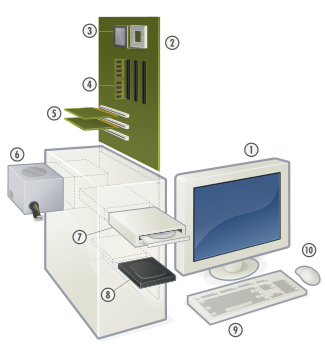
Hardware of a modern Personal Computer.
1. Monitor
2. Motherboard
3. CPU
4. RAM
5. Expansion cards
6. Power supply
7. Optical disc drive
8. Hard disk drive
9. Keyboard
10. Mouse
A personal computer is made up of multiple physical components of computer hardware, upon which can be installed a system software called operating system and a multitude of software applications to perform the operator's desired functions.
Though a PC comes in many different forms, a typical personal computer consists of a case or chassis in a tower shape (desktop), containing components such as a motherboard.

Motherboard

Main article: Motherboard
The motherboard is the main component inside the case. It is a large rectangular board with integrated circuitry that connects the rest of the parts of the computer including the CPU, the RAM, the disk drives (CD, DVD, hard disk, or any others) as well as any peripherals connected via the ports or the expansion slots.
Components directly attached to the motherboard include:
The central processing unit (CPU) performs most of the calculations which enable a computer to function, and is sometimes referred to as the "brain" of the computer. It is usually cooled by a heat sink and fan.
The chip set mediates communication between the CPU and the other components of the system, including main memory.
RAM (Random Access Memory) stores all running processes (applications) and the current running OS.
The BIOS includes boot firmware and power management. The Basic Input Output System tasks are handled by operating system drivers.
Internal Buses connect the CPU to various internal components and to expansion cards for graphics and sound.
Current
The north bridge memory controller, for RAM and PCI Express
PCI Express, for expansion cards such as graphics and physics processors, and high-end network interfaces
PCI, for other expansion cards
SATA, for disk drives
Obsolete
ATA (superseded by SATA)
AGP (superseded by PCI Express)
VLB VESA Local Bus (superseded by AGP)
ISA (expansion card slot format obsolete in PCs, but still used in industrial computers)
External Bus Controllers support ports for external peripherals. These ports may be controlled directly by the south bridge I/O controller or based on expansion cards attached to the motherboard through the PCI bus.
USB
FireWire
eSATA
SCSI

Power supply

Main article: Power supply unit (computer)


Inside a custom-built computer: the power supply at the bottom has its own cooling fan.
A power supply unit (PSU) converts alternating current (AC) electric power to low-voltage DC power for the internal components of the computer. Some power supplies have a switch to change between 230 V and 115 V. Other models have automatic sensors that switch input voltage automatically, or are able to accept any voltage between those limits. Power supply units used in computers are nearly always switch mode power supplies (SMPS). The SMPS provides regulated direct current power at the several voltages required by the motherboard and accessories such as disk drives and cooling fans.

Removable media devices

Main article: Computer storage
CD (compact disc) - the most common type of removable media, suitable for music and data.
CD-ROM Drive - a device used for reading data from a CD.
CD Writer - a device used for both reading and writing data to and from a CD.
DVD (digital versatile disc) - a popular type of removable media that is the same dimensions as a CD but stores up to 12 times as much information. It is the most common way of transferring digital video, and is popular for data storage.
DVD-ROM Drive - a device used for reading data from a DVD.
DVD Writer - a device used for both reading and writing data to and from a DVD.
DVD-RAM Drive - a device used for rapid writing and reading of data from a special type of DVD.
Blu-ray Disc - a high-density optical disc format for data and high-definition video. Can store 70 times as much information as a CD.
BD-ROM Drive - a device used for reading data from a Blu-ray disc.
BD Writer - a device used for both reading and writing data to and from a Blu-ray disc.
HD DVD - a discontinued competitor to the Blu-ray format.
Floppy disk - an outdated storage device consisting of a thin disk of a flexible magnetic storage medium. Used today mainly for loading RAID drivers.
Iomega Zip drive - an outdated medium-capacity removable disk storage system, first introduced by Iomega in 1994.
USB flash drive - a flash memory data storage device integrated with a USB interface, typically small, lightweight, removable, and rewritable. Capacities vary, from hundreds of megabytes (in the same ballpark as CDs) to tens of gigabytes (surpassing, at great expense, Blu-ray discs).
Tape drive - a device that reads and writes data on a magnetic tape, used for long term storage and backups.

Secondary storage

Hardware that keeps data inside the computer for later use and remains persistent even when the computer has no power.
Hard disk - for medium-term storage of data.
Solid-state drive - a device similar to hard disk, but containing no moving parts and stores data in a digital format.
RAID array controller - a device to manage several internal or external hard disks and optionally some peripherals in order to achieve performance or reliability improvement in what is called a RAID array.

Sound card

Main article: Sound card
Enables the computer to output sound to audio devices, as well as accept input from a microphone. Most modern computers have sound cards built-in to the motherboard, though it is common for a user to install a separate sound card as an upgrade. Most sound cards, either built-in or added, have surround sound capabilities.

Input and output peripherals

Main article: Peripheral
Input and output devices are typically housed externally to the main computer chassis. The following are either standard or very common to many computer systems.


Wheel Mouse

Input
Main article: Input device
Text input devices
Keyboard - a device to input text and characters by depressing buttons (referred to as keys).
Pointing devices
Mouse - a pointing device that detects two dimensional motion relative to its supporting surface.
Optical Mouse - uses light to determine mouse motion.
Trackball - a pointing device consisting of an exposed protruding ball housed in a socket that detects rotation about two axes.
Touchscreen - senses the user pressing directly on the display
Gaming devices
Joystick - a control device that consists of a handheld stick that pivots around one end, to detect angles in two or three dimensions.
Game pad - a hand held game controller that relies on the digits (especially thumbs) to provide input.
Game controller - a specific type of controller specialized for certain gaming purposes.
Image, Video input devices
Image scanner - a device that provides input by analyzing images, printed text, handwriting, or an object.
Web cam - a video camera used to provide visual input that can be easily transferred over the internet.
Audio input devices
Microphone - an acoustic sensor that provides input by converting sound into electrical signals.

Output
Main article: Output device
Printer - a device that produces a permanent human-readable text of graphic document.
Speakers - typically a pair of devices (2 channels) which convert electrical signals into audio.
Headphones - for a single user hearing the audio.
Monitor - an electronic visual display with textual and graphical information from the computer.
CRT - (Cathode Ray Tube) display
LCD - (Liquid Crystal Display) as of 2010, it is the primary visual display for personal computers.
LED - (light-emitting diode) display


(source:wikipedia)

Wednesday, December 1

Personal digital assistant


The Palm TX

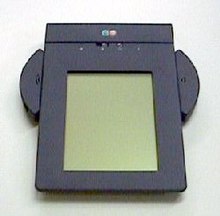
EO Personal Communicator (440) from AT&T

A personal digital assistant (PDA), also known as a palmtop computer, is a mobile device that functions as a personal information manager. Current PDAs often have the ability to connect to the Internet. A PDA has an electronic visual display, enabling it to include a web browser, but some newer models also have audio capabilities, enabling them to be used as mobile phones or portable media players. Many PDAs can access the Internet, intranets or extranets via Wi-Fi or Wireless Wide Area Networks. Many PDAs employ touchscreen technology.
The term PDA was first used on January 7, 1992 by Apple Computer CEO John Sculley at the Consumer Electronics Show in Las Vegas, Nevada, referring to the Apple Newton. In 1996, Nokia introduced the first mobile phone with full PDA functionality, the 9000 Communicator, which grew to become the world's best-selling PDA. The Communicator spawned a new category of mobile phones: the smartphone. Today, the vast majority of all PDAs are smartphones. Over 150 million smartphones are sold each year, while "stand-alone" PDAs without phone functionality sell only about 3 million units per year.
 Popular smartphone brands include HTC, Apple, Palm, Nokia N-Series, and RIM BlackBerry.

Typical features

A typical PDA has a touchscreen for entering data, a memory card slot for data storage, and IrDA, Bluetooth and/or Wi-Fi. However, some PDAs may not have a touch screen, using softkeys, a directional pad, and a numeric keypad or a thumb keyboard for input; this is typically seen on telephones that are incidentally PDAs.
In order to have the functions expected of a PDA, a device's software typically includes an appointment calendar, a to-do list, an address book for contacts, and some sort of memo (or "note") program. PDAs with wireless data connections also typically include an email client and a Web browser.

Touch screen
Many of the original PDAs, such as the Apple Newton and Palm Pilot, featured a touchscreen for user interaction, having only a few buttons—usually reserved for shortcuts to often-used programs. Touchscreen PDAs, including Windows Mobile devices, may have a detachable stylus to facilitate making selections. The user interacts with the device by tapping the screen to select buttons or issue commands, or by dragging a finger or the stylus on the screen to make selections or scroll.
Typical methods of entering text on touchscreen PDAs include:
A virtual keyboard, where a keyboard is shown on the touchscreen. Text is entered by tapping the on-screen keyboard with a finger or stylus.
An external keyboard connected via USB, Infrared, or Bluetooth. Some users may choose a chorded keyboard for one-handed use.
Handwriting recognition, where letters or words are written on the touchscreen, and the PDA converts the input to text. Recognition and computation of handwritten horizontal and vertical formulas, such as "1 + 2 =", may also be a feature.
Stroke recognition allows the user to make a predefined set of strokes on the touchscreen, sometimes in a special input area, representing the various characters to be input. The strokes are often simplified character shapes, making them easier for the device to recognize. One widely-known stroke recognition system is Palm's Graffiti).
Despite rigorous research and development projects, end-users experience mixed results with handwriting recognition systems. Some find it frustrating and inaccurate, while others are satisfied with the quality of the recognition.
Touchscreen PDAs intended for business use, such as the BlackBerry and Palm Treo, usually also full keyboards and scroll wheels or thumbwheels to facilitate data entry and navigation.
Many touchscreen PDAs support some form of external keyboard as well. Specialized folding keyboards, which offer a full-sized keyboard but collapse into a compact size for transport, are available for many models. External keyboards may attach to the PDA directly, using a cable, or may use wireless technology such as infrared or Bluetooth to connect to the PDA.
Newer PDAs, such as the Apple iPhone, Apple iPod Touch, HTC HD2, and Palm Pre, include more advanced forms of touchscreen that can register multiple touches simultaneously. These "multi-touch" displays allow for more sophisticated interfaces using various gestures entered with one or more fingers.

Memory cards
Although many early PDAs did not have memory card slots, now most have either some form of Secure Digital (SD) slot or a CompactFlash slot. Although originally designed for memory, Secure Digital Input/Output (SDIO) and CompactFlash cards are available that provide accessories like Wi-Fi or digital cameras, if the device can support them. Some PDAs also have a USB port, mainly for USB flash drives.[dubious – discuss] Some PDAs use microSD cards, which are electronically compatible with SD cards, but have a much smaller physical size.

Wired connectivity
While early PDAs connected to a user's personal computer via serial ports or another proprietary connection,[specify] many today connect via a USB cable. PDAs are not typically able to connect to each other via USB, as USB requires one machine to act as a "host," which isn't a typical PDA function.
Some early PDAs were able to connect to the Internet indirectly by means of an external modem connected via the PDA's serial port or "sync" connector, or directly by using an expansion card that provided an Ethernet port.

Wireless connectivity
Most modern PDAs have Bluetooth a popular wireless protocol for mobile devices. Bluetooth can be used to connect keyboards, headsets, GPS receivers, and other nearby accessories. It's also possible to transfer files between PDAs that have Bluetooth.
Many modern PDAs have Wi-Fi wireless network connectivity, and can connect to Wi-Fi hotspots.
All smartphones, and some other modern PDAs like the Apple iPod touch, can connect to Wireless Wide Area Networks, such as those provided by cellular telecommunications companies.
Older PDAs typically had an IrDA (infrared) port allowing short-range, line-of-sight wireless communication. Few current models use this technology, as it has been supplanted by Bluetooth and Wi-Fi. IrDA allows communication between two PDAs, or between a PDA and any device with an IrDA port or adapter. Some printers have IrDA receivers, allowing IrDA-equipped PDAs to print to them, if the PDA's operating system supports it. Most universal PDA keyboards use infrared technology because many older PDAs have it. Infrared technology is low-cost and has the advantage of being allowed aboard aircraft.

Synchronization
Most PDAs can synchronize their data with applications on a user's personal computer. This allows the user to update contact, schedule, or other information on their computer, using software such as Microsoft Outlook or ACT!, and have that same data transferred to PDA—or transfer updated information from the PDA back to the computer. This eliminates the need for the user to update their data in two places.
Synchronization also prevents the loss of information stored on the device if it is lost, stolen, or destroyed. When the PDA is repaired or replaced, it can be "re-synced" with the computer, restoring the user's data.
Some users find that data input is quicker on on their computer than on their PDA, since text input via a touchscreen or small-scale keyboard is slower than a full-size keyboard. Transferring data to a PDA via the computer is therefore a lot quicker than having to manually input all data on the handheld device.
Most PDAs come with the ability to synchronize to a computer. This is done through synchronization software provided with the handheld, or sometime with the computer's operating system. Examples of synchronization software include:
HotSync Manager, for Palm OS PDAs
Microsoft ActiveSync, used by Windows XP and older Windows operating systems to synchronize with Windows Mobile, Pocket PC, and Windows CE PDAs, as well as PDAs running iOS, Palm OS, and Symbian
Microsoft Windows Mobile Device Center for Windows Vista, which supports Microsoft Windows Mobile and Pocket PC devices.
Apple iTunes, used on Mac OS X and Microsoft Windows to sync iOS devices (such as the iPhone and iPod touch)
iSync, included with Mac OS X, can synchronize many SyncML-enabled PDAs
BlackBerry Desktop Software, used to sync BlackBerry devices
These programs allow the PDA to be synchronized with a personal information manager, which may be part of the computer's operating system, provided with the PDA, or sold separately by a third party. For example, the RIM BlackBerry comes with RIM's Desktop Manager program, which can synchronize to both Microsoft Outlook and ACT!.
Other PDAs come only with their own proprietary software. For example, some early Palm OS PDAs came only with Palm Desktop, while later Palm PDAs—such as the Treo 650—have the ability to sync to Palm Desktop aor Microsoft Outlook. Microsoft's ActiveSync and Windows Mobile Device Center only synchronize with Microsoft Outlook or a Microsoft Exchange server.
Third-party synchronization software is also available for some PDAs from companies like CommonTime and CompanionLink. Third-party software can be used to synchronize PDAs to other personal information managers that are not supported by the PDA manufacturers (for example, GoldMine and IBM Lotus Notes).

Wireless synchronization
Some PDAs can synchronize some or all of their data using their wireless networking capabilities, rather than having to be directly connected to a personal computer via a cable.
Apple iOS devices, like the iPhone, iPod Touch, and iPad, can use Apple's MobileMe subscription service to synchronize calendar, address book, mail account, Internet bookmark, and other data with one or more Macintosh or Windows computers using Wi-Fi or cellular data connections.
Palm's webOS smartphones primarily sync with the cloud. For example, if Gmail is used, information in contacts, email, and calendar can be synchronized between the phone and Google's servers.
RIM sells BlackBerry Enterprise Server to corporations so that corporate BlackBerry users can wirelessly synchronize their PDAs with the company's Microsoft Exchange Server, IBM Lotus Domino, or Novell GroupWise servers. Email, calendar entries, contacts, tasks, and memos kept on the company's server are automatically synchronized with the BlackBerry.

Automobile navigation

Some PDAs include Global Positioning System (GPS) receivers; this is particularly true of smartphones. Other PDAs are compatible with external GPS-receiver add-ons that use the PDA's processor and screen to display location information.
PDAs with GPS functionality can be used for automotive navigation. PDAs are increasingly being fitted as standard on new cars.
PDA-based GPS can also display traffic conditions, perform dynamic routing, and show known locations of roadside mobile radar guns. TomTom, Garmin, and iGO offer GPS navigation software for PDAs.


]Ruggedized PDAs

Some businesses and government organizations rely upon rugged PDAs, sometimes known as enterprise digital assistants (EDAs), for mobile data applications. EDAs often have extra features for data capture, such as barcode readers, radio-frequency identification (RFID) readers, magnetic stripe card readers, or smart card readers.
Typical applications include:
supply chain management in warehouses
package delivery
route accounting
medical treatment and recordkeeping in hospitals
facilities maintenance and management
parking enforcement
access control and security
capital asset maintenance
meter reading by utilities
"wireless waitress" applications in restaurants and hospitality venues


Medical and scientific uses

Many companies have developed PDA products aimed at the medical professions' unique needs, such as drug databases, treatment information, and medical news. Services such as AvantGo translate medical journals into PDA-readable formats. WardWatch organizes medical records, providing reminders of information such as the treatment regimens of patients and programs to doctors making ward rounds. Pendragon and Syware provide tools for conducting research with PDAs, allowing the user to enter data into a centralized database using their PDA. Microsoft Visual Studio and Sun Java also provide programming tools for developing survey instruments on the handheld. These development tools allow for integration with SQL databases that are stored on the handheld and can be synchronized with a desktop- or server-based database.
PDAs have been shown to aid diagnosis and drug selection and some studies[who?] have concluded that when patients use PDAs to record their symptoms, they communicate more effectively with hospitals during follow-up visits.
The development of Sensor Web technology may lead to wearable bodily sensors to monitor ongoing conditions, like diabetes or epilepsy, which would alert patients and doctors when treatment is required using wireless communication and PDAs.

Educational uses

As mobile technology becomes more common, it is increasingly being used as a learning tool. Some educational institutions have embraced M-Learning, integrating PDAs into their teaching practices.
PDAs and handheld devices are allowed in many classrooms for digital note-taking. Students can spell-check, modify, and amend their class notes on the PDA. Some educators distribute course material through the Internet or infrared file-sharing functions of the PDA. Textbook publishers have begun to release e-books, or electronic textbooks, which can be uploaded directly to a PDA, reducing the number of textbooks students must carry.
Software companies have developed PDA programs to meet the instructional needs of educational institutions, such as dictionaries, thesauri, word processing software, encyclopedias, and digital lesson planners.

Recreational uses
PDAs may be used by music enthusiasts to play a variety of music file formats. Many PDAs include the functionality of an MP3 player.
Road rally enthusiasts can use PDAs to calculate distance, speed, and time. This information may be used for navigation, or the PDA's GPS functions can be used for navigation.
Underwater divers can use PDAs to plan breathing gas mixtures and decompression schedules using software such as "V-Planner."


PDAs for people with disabilities

PDAs offer varying degrees of accessibility for people with differing abilities, based on the particular device and service. People with vision, hearing, mobility, or speech impairments may be able to use PDAs on a limited basis. This use may be enhanced by accessibility software (e.g., speech recognition for verbal input instead of manual input). Universal design is relevant to PDAs as well as other technology, and a viable solution for many user-access issues, though it has yet to be consistently integrated into the design of popular consumer PDA devices.
PDAs are useful for people with traumatic brain injury or posttraumatic stress disorder, as seen in troops returning home from the Iraq War and Operation Enduring Freedom. PDAs help address memory problems, helping affected people with daily life organization and reminders. As of quite recently[when?], the Department of Veterans' Affairs has issued thousands of PDAs to troops who need them. Occupational therapists have taken on a crucial role within this population helping these veterans return to the normality of life they once had.


(source:wikipedia)

Sunday, November 28

Analog computer

An analog computer is a form of computer that uses the continuously-changeable aspects of physical phenomena such as electrical, mechanical, or hydraulic quantities to model the problem being solved. In contrast, digital computers represent varying quantities incrementally, as their numerical values change.
Mechanical analog computers were very important in gun fire control in World War II and the Korean War; they were made in significant numbers. In particular, development of transistors made electronic analog computers practical, and before digital computers had developed sufficiently, they were commonly used in science and industry.
Analog computers can have a very wide range of complexity. Slide rules and nomographs are the simplest, while naval gunfire control computers and large hybrid digital/analog computers were among the most complicated.
Setting up an analog computer required scale factors to be chosen, along with initial conditions—that is, starting values. Another essential was creating the required network of interconnections between computing elements. Sometimes it was necessary to re-think the structure of the problem so that the computer would function satisfactorily. No variables could be allowed to exceed the computer's limits, and differentiation was to be avoided, typically by rearranging the "network" of interconnects, using integrators in a different sense.
Running an electronic analog computer, assuming a satisfactory setup, started with the computer held with some variables fixed at their initial values. Moving a switch released the holds and permitted the problem to run. In some instances, the computer could, after a certain running time interval, repeatedly return to the initial-conditions state to reset the problem, and run it again.


Timeline of analog computers

The Antikythera mechanism is believed to be the earliest known mechanical analog computer. It was designed to calculate astronomical positions. It was discovered in 1901 in the Antikythera wreck off the Greek island of Antikythera, between Kythera and Crete, and has been dated to circa 100 BC. Devices of a level of complexity comparable to that of the Antikythera mechanism would not reappear until a thousand years later.
The astrolabe was invented in the Hellenistic world in either the 1st or 2nd centuries BC and is often attributed to Hipparchus. A combination of the planisphere and dioptra, the astrolabe was effectively an analog computer capable of working out several different kinds of problems in spherical astronomy. An astrolabe incorporating a mechanical calendar computer and gear-wheels was invented by Abi Bakr of Isfahan in 1235.
Abū Rayhān al-Bīrūnī invented the first mechanical geared lunisolar calendar astrolabe, an early fixed-wired knowledge processing machine with a gear train and gear-wheels, circa 1000 AD.
The Planisphere was a star chart astrolabe invented by Abū Rayhān al-Bīrūnī in the early 11th century.
The castle clock, an astronomical clock invented by Al-Jazari in 1206, has been described by some as the first programmable analog computer. It displayed the zodiac, the solar and lunar orbits, a crescent moon-shaped pointer travelling across a gateway causing automatic doors to open every hour, and five robotic musicians who play music when struck by levers operated by a camshaft attached to a water wheel. The length of day and night could be re-programmed every day in order to account for the changing lengths of day and night throughout the year.

A slide rule
The slide rule is a hand-operated analog computer for doing (at least) multiplication and division, invented around 1620–1630, shortly after the publication of the concept of the logarithm. As slide rule development progressed, added scales provided reciprocals, squares and square roots, cubes and cube roots, as well as transcendental functions such as logarithms and exponentials, circular and hyperbolic trigonometry and other functions .
The differential analyser, a mechanical analog computer designed to solve differential equations by integration, using wheel-and-disc mechanisms to perform the integration. Invented in 1876 by James Thomson, they were first built in the 1920s and 1930s. Extensions and enhancements were the basis of some parts of mechanical analog gun fire control computers.
By 1912 Arthur Pollen had developed an electrically driven mechanical analog computer for fire-control systems, based on the differential analyser. It was used by the Imperial Russian Navy in World War I.
World War II era gun directors, gun data computers, and bomb sights used mechanical analog computers.
The FERMIAC was an analog computer invented by physicist Enrico Fermi in 1947 to aid in his studies of neutron transport.
The MONIAC Computer was a hydraulic model of a national economy first unveiled in 1949.
Computer Engineering Associates was spun out of Caltech in 1950 to provide commercial services using the "Direct Analogy Electric Analog Computer" ("the largest and most impressive general-purpose analyzer facility for the solution of field problems") developed there by Gilbert D. McCann, Charles H. Wilts, and Bart Locanthi.
Heathkit EC-1, a $199 educational analog computer made by the Heath Company, USA c. 1960. It was programmed using patch cords that connected nine operational amplifiers and other components 
General Electric also marketed an "educational" analog computer kit of a simple design in the early 1960s consisting of a two transistor tone generator and three potentiometers wired such that the frequency of the oscillator was nulled when the potentiometer dials were positioned by hand to satisfy an equation. The relative resistance of the potentiometer was then equivalent to the formula of the equation being solved. Multiplication or division could be performed depending on which dials were considered inputs and which was the output. Accuracy and resolution was, of course, extremely limited and a simple slide rule was more accurate, however, the unit did demonstrate the basic principle.

Electronic analog computers


Polish analog computer AKAT-1.
The similarity between linear mechanical components, such as springs and dashpots (viscous-fluid dampers), and electrical components, such as capacitors, inductors, and resistors is striking in terms of mathematics. They can be modeled using equations that are of essentially the same form.
However, the difference between these systems is what makes analog computing useful. If one considers a simple mass-spring system, constructing the physical system would require making or modifying the springs and masses. This would be followed by attaching them to each other and an appropriate anchor, collecting test equipment with the appropriate input range, and finally, taking measurements. In more complicated cases, such as suspensions for racing cars, experimental construction, modification, and testing is not so simple nor inexpensive.
The electrical equivalent can be constructed with a few operational amplifiers (Op amps) and some passive linear components; all measurements can be taken directly with an oscilloscope. In the circuit, the (simulated) 'stiffness of the spring', for instance, can be changed by adjusting a potentiometer. The electrical system is an analogy to the physical system, hence the name, but it is less expensive to construct, generally safer, and typically much easier to modify.
As well, an electronic circuit can typically operate at higher frequencies than the system being simulated. This allows the simulation to run faster than real time (which could, in some instances, be hours, weeks, or longer). Experienced users of electronic analog computers said that they offered a comparatively intimate control and understanding of the problem, relative to digital simulations.
The drawback of the mechanical-electrical analogy is that electronics are limited by the range over which the variables may vary. This is called dynamic range. They are also limited by noise levels. Floating-point digital calculations have comparatively-huge dynamic range (good modern handheld scientific/engineering calculators have exponents of 500).
These electric circuits can also easily perform a wide variety of simulations. For example, voltage can simulate water pressure and electric current can simulate rate of flow in terms of cubic metres per second (in fact, given the proper scale factors, all that is required would be a stable resistor, in that case). Given flow rate and accumulated volume of liquid, a simple integrator provides the latter; both variables are voltages. In practice, current was rarely used in electronic analog computers, because voltage is much easier to work with.
Analog computers are especially well-suited to representing situations described by differential equations. Occasionally, they were used when a differential equation proved very difficult to solve by traditional means.
An electronic digital system uses two voltage levels to represent binary numbers. In many cases, the binary numbers are simply codes that correspond, for instance, to brightness of primary colors, or letters of the alphabet (or other symbols). The manipulation of these binary numbers is how digital computers work. The electronic analog computer, however, manipulates electrical voltages that are proportional to the magnitudes of quantities in the problem being solved.
Accuracy of an analog computer is limited by its computing elements as well as quality of the internal power and electrical interconnections. The precision of the analog computer readout was limited chiefly by the precision of the readout equipment used, generally three or four significant figures. Precision of a digital computer is limited by the word size; arbitrary-precision arithmetic, while relatively slow, provides any practical degree of precision that might be needed.

Analog-digital hybrid computers

There is an intermediate device, a 'hybrid' computer, in which an analog output is converted into digits. The information then can be sent into a standard digital computer for further computation. Because of their ease of use and because of technological breakthroughs in digital computers in the early 70s, the analog-digital hybrids were replacing the analog-only systems.
Hybrid computers are used to obtain a very accurate but not very mathematically precise 'seed' value, using an analog computer front-end, which value is then fed into a digital computer, using an iterative process to achieve the final desired degree of precision. With a three or four digit precision, highly-accurate numerical seed, the total computation time necessary to reach the desired precision is dramatically reduced, since many fewer digital iterations are required (and the analog computer reaches its result almost instantaneously). Or, for example, the analog computer might be used to solve a non-analytic differential equation problem for use at some stage of an overall computation (where precision is not very important). In any case, the hybrid computer is usually substantially faster than a digital computer, but can supply a far more precise computation than an analog computer. It is useful for real-time applications requiring such a combination (e.g., a high frequency phased-array radar or a weather system computation).


Polish Analog computer ELWAT.

Mechanisms

Electronic analog computers typically have front panels with numerous jacks (single-contact sockets) that permit patch cords (flexible wires with plugs at both ends) to create the interconnections which define the problem setup. In addition, there are precision high-resolution potentiometers (variable resistors) for setting up (and, when needed, varying) scale factors. In addition, there is likely to be a zero-center analog pointer-type meter for modest-accuracy voltage measurement. Stable, accurate voltage sources provide known magnitudes.
Typical electronic analog computers contain anywhere from a few to a hundred or more operational amplifiers ("op amps"), named because they perform mathematical operations. Op amps are a particular type of feedback amplifier with very high gain and stable input (low and stable offset). They are always used with precision feedback components that, in operation, all but cancel out the currents arriving from input components. The majority of op amps in a representative setup are summing amplifiers, which add and subtract analog voltages, providing the result at their output jacks. As well, op amps with capacitor feedback are usually included in a setup; they integrate the sum of their inputs with respect to time.
Integrating with respect to another variable is the nearly-exclusive province of mechanical analog integrators; it is almost never done in electronic analog computers. However, given that a problem solution does not change with time, time can serve as one of the variables.
Other computing elements include analog multipliers, nonlinear function generators, and analog comparators.
Inductors were never used in typical electronic analog computers, because their departure from ideal behavior is too great for computing of any great accuracy. Analog computer setups that at first would seem to require inductors can be rearranged and redefined to use capacitors. Capacitors and resistors, on the other hand, can be made much closer to ideal than inductors, which is why they constitute the majority of passive computing components.
The use of electrical properties in analog computers means that calculations are normally performed in real time (or faster), at a speed determined mostly by the frequency response of the operational amplifiers and other computing elements. In the history of electronic analog computers, there were some special high-speed types.
Nonlinear functions and calculations can be constructed to a limited precision (three or four digits) by designing function generators — special circuits of various combinations of resistors and diodes to provide the nonlinearity. Typically, as the input voltage increases, progressively more diodes conduct.
When compensated for temperature, the forward voltage drop of a transistor's base-emitter junction can provide a usably-accurate logarithmic or exponential function. Op amps scale the output voltage so that it is usable with the rest of the computer.
Any physical process which models some computation can be interpreted as an analog computer. Some examples, invented for the purpose of illustrating the concept of analog computation, include using a bundle of spaghetti as a model of sorting numbers; a board, a set of nails, and a rubber band as a model of finding the convex hull of a set of points; and strings tied together as a model of finding the shortest path in a network. These are all described in A.K. Dewdney (see citation below).

Mechanical analog computer mechanisms
While a wide variety of mechanisms have been developed throughout history, some stand out because of their theoretical importance, or because they were manufactured in significant quantities.
Most practical mechanical analog computers of any significant complexity used rotating shafts to carry variables from one mechanism to another. Cables and pulleys were used in a Fourier synthesizer, a tide-predicting machine, which summed the individual harmonic components. Another category, not nearly as well known, used rotating shafts only for input and output, with precision racks and pinions. The racks were connected to linkages that performed the computation. At least one US Naval sonar fire control computer of the later 1950s, made by Librascope, was of this type, as was the principal computer in the Mk. 56 Gun Fire Control System.
Online, there is a remarkably-clear illustrated reference (OP 1140) that describes World War II mechanical analog fire control computer mechanisms. Lacking access to OP 1140, a text description of many important mechanisms follows.
For adding and subtracting, precision miter-gear differentials were in common use in some computers; the Ford Instrument Mk 1 Fire Control Computer contained about 160 of them.
Integration with respect to another variable was done by a rotating disc driven by one variable. Output came from a pickoff device (such as a wheel) positioned at a radius on the disc proportional to the second variable. (A carrier with a pair of steel balls supported by small rollers worked especially well. A roller, its axis parallel to the disc's surface, provided the output. It was held against the pair of balls by a spring.)
Arbitrary functions of one variable were provided by cams, with gearing to convert follower movement to shaft rotation.
Functions of two variables were provided by three-dimensional cams. In one good design, one of the variables rotated the cam. A hemispherical follower moved its carrier on a pivot axis parallel to that of the cam's rotating axis. Pivoting motion was the output. The second variable moved the follower along the axis of the cam. One practical application was ballistics in gunnery.
Coordinate conversion from polar to rectangular was done by a mechanical resolver (called a "component solver" in US Navy fire control computers). Two discs on a common axis positioned a sliding block with pin (stubby shaft) on it. One disc was a face cam, and a follower on the block in the face cam's groove set the radius. The other disc, closer to the pin, contained a straight slot in which the block moved. The input angle rotated the latter disc (the face cam disc, for an unchanging radius, rotated with the other (angle) disc; a differential and a few gears did this correction).
Referring to the mechanism's frame, the location of the pin corresponded to the tip of the vector represented by the angle and magnitude inputs. Mounted on that pin was a square block.
Rectilinear-coordinate outputs (both sine and cosine, typically) came from two slotted plates, each slot fitting on the block just mentioned. The plates moved in straight lines, the movement of one plate at right angles to that of the other. The slots were at right angles to the direction of movement. Each plate, by itself, was like a Scotch yoke, known to steam engine enthusiasts.
During World War II, a similar mechanism converted rectilinear to polar coordinates, but it was not particularly successful and was eliminated in a significant redesign (USN, Mk. 1 to Mk. 1A).
Multiplication was done by mechanisms based on the geometry of similar right triangles. Using the trig. terms for a right triangle, specifically opposite, adjacent, and hypotenuse, the adjacent side was fixed by construction. One variable changed the magnitude of the opposite side. In many cases, this variable changed sign; the hypotenuse could coincide with the adjacent side (a zero input), or move beyond the adjacent side, representing a sign change.
Typically, a pinion-operated rack moving parallel to the (trig.-defined) opposite side would position a slide with a slot coincident with the hypotenuse. A pivot on the rack let the slide's angle change freely. At the other end of the slide (the angle, in trig, terms), a block on a pin fixed to the frame defined the vertex between the hypotenuse and the adjacent side.
At any distance along the adjacent side, a line perpendicular to it intersects the hypotenuse at a particular point. The distance between that point and the adjacent side is some fraction that is the product of 1 the distance from the vertex, and 2 the magnitude of the opposite side.
The second input variable in this type of multiplier positions a slotted plate perpendicular to the adjacent side. That slot contains a block, and that block's position in its slot is determined by another block right next to it. The latter slides along the hypotenuse, so the two blocks are positioned at a distance from the (trig.) adjacent side by an amount proportional to the product.
To provide the product as an output, a third element, another slotted plate, also moves parallel to the (trig.) opposite side of the theoretical triangle. As usual, the slot is perpendicular to the direction of movement. A block in its slot, pivoted to the hypotenuse block positions it.
A special type of integrator, used at a point where only moderate accuracy was needed, was based on a steel ball, instead of a disc. It had two inputs, one to rotate the ball, and the other to define the angle of the ball's rotating axis. That axis was always in a plane that contained the axes of two movement-pickoff rollers, quite similar to the mechanism of a rolling-ball computer mouse (in this mechanism, the pickoff rollers were roughly the same diameter as the ball). The pickoff roller axes were at right angles.
A pair of rollers "above" and "below" the pickoff plane were mounted in rotating holders that were geared together. That gearing was driven by the angle input, and established the rotating axis of the ball. The other input rotated the "bottom" roller to make the ball rotate.
Essentially, the whole mechanism, called a component integrator, was a variable-speed drive with one motion input and two outputs, as well as an angle input. The angle input varied the ratio (and direction) of coupling between the "motion" input and the outputs according to the sine and cosine of the input angle.
Although they were did not accomplish any computation, electromechanical position servos were essential in mechanical analog computers of the "rotating-shaft" type for providing operating torque to the inputs of subsequent computing mechanisms, as well as driving output data-transmission devices such as large torque-transmitter synchros in naval computers.
Other non-computational mechanisms included internal odometer-style counters with interpolating drum dials for indicating internal variables, and mechanical multi-turn limit stops.
Considering that accurately-controlled rotational speed in analog fire-control computers was a basic element of their accuracy, there was a motor with its average speed controlled by a balance wheel, hairspring, jeweled-bearing differential, a twin-lobe cam, and spring-loaded contacts (ship's AC power frequency was not necessarily accurate, nor dependable enough, when these computers were designed).

Components


A 1960 Newmark analogue computer, made up of five units. This computer was used to solve differential equations and is currently housed at the Cambridge Museum of Technology.
Analog computers often have a complicated framework, but they have, at their core, a set of key components which perform the calculations, which the operator manipulates through the computer's framework.
Key hydraulic components might include pipes, valves and containers.
Key mechanical components might include rotating shafts for carrying data within the computer, miter-gear differentials, disc/ball/roller integrators, cams (2-D and 3-D), mechanical resolvers and multipliers, and torque servos.
Key electrical/electronic components might include:
Precision resistors and capacitors
operational amplifiers
Multipliers
potentiometers
fixed-function generators
The core mathematical operations used in an electric analog computer are:
summation
integration with respect to time
inversion
multiplication
exponentiation
logarithm
division, although multiplication is much preferred
Differentiation with respect to time is not frequently used, and in practice is avoided by redefining the problem when possible. It corresponds in the frequency domain to a high-pass filter, which means that high-frequency noise is amplified; differentiation also risks instability.

Limitations

In general, analog computers are limited by non-ideal effects. An analog signal is composed of four basic components: DC and AC magnitudes, frequency, and phase. The real limits of range on these characteristics limit analog computers. Some of these limits include the operational amplifier offset, finite gain, and frequency response, noise floor, non-linearities, temperature coefficient, and parasitic effects within semiconductor devices. For commercially available electronic components, ranges of these aspects of input and output signals are always figures of merit.

Current research

Although digital computation is extremely popular, some research in analog computation is still being done. A few universities still use analog computers to teach control system theory. Comdyna manufactured small analog computers until roughly the end of the 20th century. At Indiana University Bloomington, Jonathan Mills has developed the Extended Analog Computer based on sampling voltages in a foam sheet. At the Harvard Robotics Laboratory, analog computation is a research topic.

Practical examples

These are examples of analog computers that have been constructed or practically used:
Antikythera mechanism
astrolabe
differential analyzer
Deltar
Kerrison Predictor
mechanical integrators, fo example, the planimeter
MONIAC Computer (hydraulic model of UK economy)
nomogram
Norden bombsight
Rangekeeper and related fire control computers
slide rule
tide-predicting machine
Torpedo Data Computer
Torquetum
Water integrator
Mechanical computer
Analog (music) synthesizers can also be viewed as a form of analog computer, and their technology was originally based in part on electronic analog computer technology. The ARP 2600's Ring Modulator was actually an moderate-accuracy analog multiplier.
The Simulation Council (or Simulations Council) was an association of analog computer users in USA. It is now known as the The Society of Modeling and Simulation International. The Simulation Council newsletters from 1952 to 1963 are available online and show the concerns and technologies at the time, and the common use of analog computers for missilry.

Real computers

Computer theorists often refer to idealized analog computers as real computers (because they operate on the set of real numbers). Digital computers, by contrast, must first quantize the signal into a finite number of values, and so can only work with the rational number set (or, with an approximation of irrational numbers).
These idealized analog computers may in theory solve problems that are intractable on digital computers; however as mentioned, in reality, analog computers are far from attaining this ideal, largely because of noise minimization problems. In theory, ambient noise is limited by quantum noise (caused by the quantum movements of ions). Ambient noise may be severely reduced — but never to zero — by using cryogenically cooled parametric amplifiers. Moreover, given unlimited time and memory, the (ideal) digital computer may also solve real number problems.


(source:wikpedia)