Showing posts with label History of mobile phones. Show all posts

Friday, January 14

Silicon Alley

Silicon Alley is a nickname for an area with a concentration of Internet and new media companies in Manhattan, New York City. Originally, the term referred to the cluster of such companies extending from the Flatiron District down to SoHo and TriBeCa along the Broadway corridor, but as the location of these companies spread out, it became a general term referring to the dot com industry in New York City as a whole.
The term was in most common use in the late 1990s, when companies such as Agency.com, Razorfish, Medscape, inet-d and The Mining Company (now About.com), became success stories with successful private buyouts or IPOs.
The first publication to cover Silicon Alley was @NY, an online newsletter founded in the summer of 1995 by Tom Watson and Jason Chervokas. The first magazine to focus on the venture capital opportunities in Silicon Alley, AlleyCat News co-founded by Anna Copeland Wheatley and Janet Stites, was launched in the fall of 1996. Courtney Pulitzer branched off from her @The Scene column with @NY and created Courtney Pulitzer's Cyber Scene and her popular networking events Cocktails with Courtney. First Tuesday, co-founded by Vincent Grimaldi de Puget and John Grossbart, became the largest gathering of Silicon Alley, welcoming 500 to 1000 venture capitalists and entrepreneurs every month. It was an initiative of law firm Sonnenschein and the Kellogg School of Management, as well as other corporate founders, including Accenture (then Andersen Consulting), AlleyCat News and Merrill Lynch. Silicon Alley Reporter started publishing in October 1996. It was founded by Jason Calacanis and was in business from 1996-2001. @NY, print magazines, and the attending media coverage by the larger New York press helped to popularize both the name, and the idea of New York City as a dot-com center.
In 1997, over 200 members and leaders of Silicon Alley joined NYC entrepreneurs, Andrew Rasiej and Cecilia Pagkalinawan to help wire Washington Irving High School to the internet. This response and the Department of Education's growing need for technology integration marked the birth of MOUSE, an organization that today serves tens of thousands of underserved youth in schools in five states and over 20 countries. After the bubble burst, Silicon Alley Reporter was rebranded as Venture Reporter in September 2001 and sold to Dow Jones. Self-financed AlleyCat News ceased publication in October 2001.
A couple of years after the internet bust, Silicon Alley began making its comeback with the help of NY Tech meetup and NextNY. Since 2003 Silicon Alley has seen a steady growth in the number of start-ups and has joined the ranks of Boston and San Francisco as one of the three leading technology centers in the United States. As of 2007 Google's second largest office is located in New York. And, as of 2009, New York's Silicon Alley has become the startup leader in advertising, new media, financial technologies such as Eyeblaster, DoubleClick, Roo, IAC, meetup.com and a slew of web 2.0 companies. According to the National Venture Capital Association, 247 venture capital deals worth $1.4 billion closed in New York in 2009, despite the recession and rocky market. New York still ranks third behind Silicon Valley and Boston in the number of deals and overall investment rates, but New York is holding its own against the other big hubs and possibly beginning to increase its share.
Silicon Alley has also become the home to a significant number of European, Australian, and particularly Israeli startups that have taken advantage of New York City's central location and the 7 hours time difference between the developing team in Israel and the business team in New York that is more manageable than the 10 hours difference between Israel and California's Silicon Valley.
The name is derived from Silicon Valley, California.

See also


(source:wikipedia)

Tuesday, January 4

WorldCall

WorldCall
TypeMultimedia Service Provider
IndustryTelecommunication
Founded1996
Headquarters Pakistan
Key peopleSalman Taseer
Websitewww.worldcall.pk
WorldCALL is a telecommunication operator in Pakistan which provides services such as Cable TV, Broadband Internet, 3G EVDO Internet, pay-phone services, dial-up Internet cards and wireless telephone. It was established in 1996 by First Capital Securities Corporation .

History

In 1996, First Capital Securities Corporation began to incubate a payphone operation called Worldcall Payphones Limited. At that time, notable development was being done to improve the payphone infrastructure in the country. The first payphone was installed in June 1996. Now, Worldcall has over 70,000 payphones all over the country and the company has become one of the largest fixed line payphone operator and the pioneers of “Supervised Payphones” business model in Pakistan.

Prepaid Calling Cards

In 1998 prepaid calling cards were launched by Worldcall Phonecards under the brand name "Hello". In the following year the group established dial-up internet services through Worldcall Dot Com.

Overseas Operations

In 1999 Worldcall Telecom Lanka established the Groups' first overseas presence when payphone operations were established in Sri Lanka.

Cable and Internet Services

In 2000 Worldcall Multimedia established a Hybrid Fiber Coaxial (HFC) scalable network in Lahore thus becoming the first Multi-service operator in the country, providing cable television and Internet-over-cable. In cable TV in Lahore, Worldcall was the last entrant and by far the largest. In 2003 the company launched an HFC network operation in Karachi under Worldcall Broadband Limited (WBL). These were the largest and only national networks capable of triple play (cable TV, high speed internet/data and telephony) until the introduction of Wateen Telecom. The broadband division also offers metro fiber lease to a number of other telecom / cellular operators as well as corporates. Currently Worldcall is one of the few operators who are providing Digital Cable in Lahore, Karachi and Islamabad.

Wireless Local Loop Services

Worldcall Telecom Limited acquired Wireless Local Loop (WLL) licenses/spectrum in the post deregulation auction to provide WLL telephony in all 14 telecom regions of Pakistan primarily in the 1900 MHz band. It has partnered with Samsung for a CDMA 2000 1x solution (with EVDO option). WTL started service from Lahore in June 2005 which is now available in over 40 cities. WTL also acquired an LDI license and service commenced at the end of 2004. WTL has increased competition due to rights to dark fibers in a national long haul network which is being built across Pakistan.


(source:wikipedia)

Friday, December 17

Mobile phones on aircraft


Mobile phones on aircraft

Mobile phones on aircraft are strictly regulated as concerns exist that mobile phones pose a danger to the aircraft and passengers. It is thought they could adversely affect the navigational instruments in the cockpit and so such devices must be turned off while the aircraft is airborne.
The use of mobile phones and similar devices has been banned by regulatory bodies such as the United States' Federal Aviation Administration and others across the world. Many reasons have been given and tests have been performed to try and identify any possible interference that may arise from their usage in–flight. The general conclusions are that any risk that may cause aircraft failure and passenger deaths is too high until testing confirms that the risks have been dealt with or do not exist.
The major problems are that the mobile phones or other electronic devices may interfere with aircraft systems or computers due to poor or missing shielding and so cause a catastrophic failure of the control mechanisms. There have been few instances where a definite link between device use and system failures have been proven and in those cases where a correlation has been shown it has tended to be where shielding was in fact not present, of bad quality or had been compromised.
Since the regulations were imposed by the various international bodies there have been advances in equipment and systems which have allowed the gradual introduction of safe in-flight communications via mobile phones and such devices. These systems are being implemented by an increasing number of airlines and carriers as each is tested by the authority responsible for air-safety and deemed to be fit for use.

Mobile phone usage issues

Electromagnetic interference
Electromagnetic interference to aircraft systems is theoretically possible from active radio transmitters such as mobile phones, small walkie–talkies or radio remote–controlled toys and also from unintentional emitters such as ordinary radio receivers, computers and virtually any non–trivial electronic device. However, there has been little empirical support of this theory and studies have either been non-conclusive or found there there is no evidence that use of electronic devices on could interfere with an aircraft's systems.
There are some reports that indicate this and some that refute it:
Boeing performed extensive tests as reported in AeroMagazine's Interference from Electronic Devices in response to reports by flight crews of anomalies that they believed to be caused by electronic devices. The flight crews had apparently confirmed the effect by switching the "suspect" devices on and off and watching the effects. Despite this and despite the fact that Boeing in many cases was able to purchase the actual offending device from the passenger and use it in extensive testing Boeing was never able to reproduce any of the anomalies. The report concludes:
As a result of these and other investigations, Boeing has not been able to find a definite correlation between PEDs and the associated reported airplane anomalies.

ABC News 20/20 aired a report in December 2007 trying to get to the bottom of the ban on cell phone usage in aircraft. They interviewed one of the authors of the IEEE Spectrum report cited below but also noted that this study was not designed to actually detect interference–only that cellphones which are not switched off. The report concludes that the primary reason for the ban on cell phone use in flight is that neither the FAA nor the FCC are willing to spend the money to perform conclusive safety tests. They have left this up to the airlines who do not see any return on investment made in paying for such tests. According to the 20/20 website ABC News consultant and veteran airline pilot John J. Nance states categorically:
There's little reason to worry about cell phones interfering with an airplane's navigational equipment. Nance says an airplane's electronic systems are "all heavily shielded. That means that stray signals cannot get into those systems."

A NASA publication details the fifty most recent reports to the Aviation Safety Reporting System (ASRS) regarding "avionics problems that may result from the influence of passenger electronic devices." The nature of these reports varies widely. Some merely describe passengers' interactions with flight crews when asked to stop using an electronic device. Other reports amount to crews reporting an anomaly experienced at the same time a passenger was witnessed using a mobile phone which indicates only a weak correlation and not causality. However a few reports state that anomalies were observed to appear and disappear as the suspect device was turned on and off which would indicate a high degree of correlation.
A NASA report from 2001 summarizes "14 years of incidents reported by pilots to the ASRS" of interference caused, or suspected to be caused, by passengers electronic devices. Mobile phones were the most frequently identified source of interference with laptop computers a close second. In no cases were the affected avionics found to be defective upon later testing. Degrees of correlation or confidence were not among the data summarized in the report.
A 2003 study involved three months of testing with RF spectrum analyzers and other instruments aboard regular commercial flights. The report found that on a typical flight at least one mobile phone is likely to be left on throughout the flight and that a mobile phone in use produces a far stronger signal than one that is simply left switched on. In the authors' words:
There is no smoking gun to this story: there is no definitive instance of an air accident known to have been caused by a passenger's use of an electronic device. Nonetheless, although it is impossible to say that such use has contributed to air accidents in the past, the data also make it impossible to rule it out completely. More important, the data support a conclusion that continued use of portable RF-emitting devices such as cellphones will, in all likelihood, someday cause an accident by interfering with critical cockpit instruments such as GPS receivers. This much is certain: there exists a greater potential for problems than was previously believed.

A 2000 study by the British Civil Aviation Authority concluded that:
interference levels produced by a portable telephone, used near the flight deck or avionics equipment bay, will exceed demonstrated susceptibility levels for equipment qualified to standards published prior to July 1984. Since equipment qualified to these standards are installed in older aircraft, and can be installed (and is known to be installed) in newly built aircraft, current policy for restricting the use of portable telephones on all aircraft will need to remain in force.. …For safety reasons, the Regulatory Authorities should continue to prohibit the use of portable telephones by passengers on aircraft whilst the engines are running.

A report from BBC news comments that "most of the evidence is circumstantial and anecdotal. There is no absolute proof mobile phones are hazardous." It also quotes Dan Hawkes the head of avionic systems at the Civil Aviation Authority (CAA):
There's an industry consensus, throughout the world, that mobile phones are a potential hazard to aircraft and must be switched off. A typical aircraft these days could have anything up to 15 or more radio systems on board. The signals that a mobile phone gives out could penetrate into equipment, and could affect the operation of the computer. The computer may shut down, which would affect the aircraft's navigation, which in turn would affect the signals sent to the auto pilot, and the way the aircraft is automatically flown. The aircraft might go off course, and even might change height.

Whether interference from small battery-powered devices should have any influence on electronic systems that should be designed to fly through lightning storms without failing is often disputed by critics of the ban. An article by Tekla S. Perry and Linda Geppert, then editors of IEEE Spectrum, offers an explanation: "While a brand new aircraft may indeed be completely immune from such interference, shielding and other mechanisms that normally protect the avionics do degrade over time, after thousands of takeoffs, landings, and pressurization cycles and various maintentance procedures. Similarly, the shielding in passengers' devices also degrades due to the passage of time and, in some cases, repair procedures."
While certainly not a rigorous scientific study the Discovery Channel television program MythBusters examined the "myth" that mobile phones are banned aboard aircraft to force passengers to use the airline's inflight phones. They concluded that this is "busted". Their tests caused no interference to a small airplane's avionics but did to unshielded equipment. They concluded that interference could occur aboard an aircraft if the shielding was not working correctly.

Conclusions
The cost of an accident, should one occur, could be extremely high in terms of human life and the risk is completely avoidable in that no one absolutely needs to use their mobile phone in flight. The regulatory agencies and aviation industry take the position that any increased risk is unacceptable if it is avoidable.
Some mobile phone systems such as GSM may cause an irritating buzz, which could disrupt communications from the pilot to ground. The high speed of air travel may make interference more likely than it would otherwise be. The maximum speed of travel in a mobile phone system is limited by several factors; frequency changes, rate of change of timing offset, etc. and the speed of an airplane often exceeds these as, typically, mobile phones are designed for use in a fast car which means the phone will fail to register to the network and retry registration repeatedly.

Other factors

Social resistance to mobile phone use on flights
People may prefer a ban on Mobile phone use in flight as it prevents undue amounts of noise from cellphone chatter. For several reasons people tend to talk more loudly into Mobile phone than they do when talking in person.
AT&T has suggested that in-flight mobile phone restrictions should remain in place in the interests of reducing the nuisance to other passengers caused by someone talking loudly on a phone next to them.

Competition for airlines' in-flight phone service
Skeptics of the ban believe that the airlines support the ban because they do not want passengers to have an alternative to the in-flight phone service such as GTE's Airphone.These services are much more expensive than mobile phone services. They also provide extremely slow data rates at a similarly high price. In general the airlines have had little success in selling these services and the in-flight phone equipment has disappeared from most U.S. domestic flights.
It could be easy to believe that the airlines support a continued ban on mobile phone use so as to force customers to use the in-flight phone service with comments such as those made by Andy Plews a spokesman for UAL's United Airlines. "We don't believe it's a good safety issue"..."We'd like people to use the air phones."

Current status

Emirates Airline
On 20 March 2008, Emirates Airline flights began allowing in-flight voice calls on some commercial airline flights.
The approval by EASA of these systems has established that GSM phones on certified aircraft types are considered safe to use when installed with an on-board cellular picocell.

Europe
AeroMobile and OnAir allow the use of personal electronics devices aboard flights. The services are most prevalent in Europe and are licensed to specific airlines for use.

Malaysia Airlines
Malaysia Airlines flights are installed with AeroMobile systems to enable in flight voice calls and text messages.

Mobile phone on corporate jets
Falcon 2000 on 2 April 2009 implemented a new concept designated SafeCell when it commenced flying.

United States
To prevent disruption to the cell phone network from the effects of fast-moving cell phones at altitude (see discussion below), the FCC has banned the use of cell phones on all aircraft in flight. The FCC did, however, allocate spectra in the 450 MHz and 800 MHz frequency bands for use by equipment designed and tested as "safe for air-to-ground service" and these systems use widely separated ground stations. In the 450 MHz band co-channel assignments are at least 497 miles apart and in the 800 MHz band only specific sites were authorized by the FCC. The 450 MHz service is limited to "general aviation" users, in corporate jets mostly, while the 800 MHz spectrum can be used by airliners as well as for general aviation. The 450 MHz spectrum is named AGRAS while the 800 MHz service is under review following an auction of the spectrum in 2006.

Regulations and practices
Mobile phones are portable electronic devices and, as such, are banned from use in civilian airplanes by the Federal Aviation Agency unless the operator of a commercial aircraft or pilot of a private aircraft determines that it could not cause interference to avionics in the aircraft.
The FAA in 14 C.F.R § 91.21 bans the use of all portable electronic devices (with a few odd exceptions) for all flights operated by an airline or those flights under Instrument flight rules (IFR). It does allow that the airline (or for privately operated aircraft the pilot) can make an exception to this rule if the operator deems that device safe. This effectively gives the airline, or pilot, the final word as to what devices may be used aboard an aircraft as far as the FAA is concerned although the FCC restriction still applies.
Note that for aircraft operated by an airline the pilot is not considered the "operator" and cannot legally allow exceptions to the airline's restrictions although the pilot may dictate additional restrictions.
No U.S. airlines have approved the use of mobile phones while in flight.
The FAA in Advisory Circular 91.21-1A recommends that aircraft operators blanket ban all intentional transmitters and mentions specifically CB radios, remote control devices and cellular phones. While Advisory Circulars are not legally binding air carriers rarely ignore the official written advice from the FAA.
This Advisory Circular has since been superseded by AC 91.21.1B.
Federal Avaiation Regulation (FAR) 91.21 states that the Pilot In Command of an aircraft that is NOT IFR, and NOT Part 121 (Commercial Air Carriers), can allow usage of "Portable Electronic Devices". However to take the attitude that "The FAA doesn't say I can't do it" is incorrect, particularly in the category of radiotelephone communications governed by the FCC. FCC regulations, and specifically Title 47 Part 22.925 (Oct 1, 2006 revision), states "Cellular telephones installed in or carried aboard airplanes, balloons or any other type of aircraft must not be operated while such aircraft are airborne (not touching the ground). When an aircraft leaves the ground, all cellular telephones on board that aircraft must be turned off.".
The use of cell phones aboard airborne planes is banned by the FCC in 47 C.F.R. § 22.925: "The use of cellular telephones while this aircraft is airborne is prohibited by FCC rules.... The use of cellular telephones while this aircraft is on the ground is subject to FAA regulations." This ban applies to phones that use the 800 MHz spectrum. Personal Communications Services (PCS) phones that use the 1900 MHz spectrum are governed under FCC 47CFR24 and their use in aircraft is not restricted by the FCC whether on the ground or in flight.

Cell tower channel re-use
The U.S. Federal Communications Commission (FCC) currently prohibits the use of mobile telephones aboard any aircraft in flight. The reason given is that mobile phone systems depend on channel reuse and operating a phone at altitude may violate the fundamental assumptions that allow channel reuse to work.
The FCC is also concerned that the use, or even non-use, of a powered cell phone could cause disruption to the cell systems' towers and has banned their use.
Mobile telephones are intentionally designed with a low power output. A tower is the center of a "cell" and due to attenuation with distance (inverse square law) cell phone transmissions can usually be received only weakly by towers in adjacent cells and not at all in cells farther away (non-adjacent cells). This allows the channel used by any given phone to be reused by other phones in non-adjacent cells. This principle allows tens or hundreds of thousands of people to use their phones at the same time in a given metropolitan area while using only a limited number of channels.
Channel reuse works because a mobile phone on the ground will only have one "closest" tower that can possibly use a particular group of frequencies, CDMA codes, or time slots. The software that manages the system assumes that the signal from a phone on a particular tower can, on other towers, only be "heard" at greatly reduced signal strength. The frequency, code, or time slot used by the phone can therefore be reused by other phones on other towers.
In the old analog cell system a channel was simply a frequency pair: There were seven groups of 35 channels each and no two adjacent cells used the same channel groups. Modern CDMA and TDMA systems are more complex: A channel in TDMA is a frequency pair, and a time slot, and a channel in CDMA is a spread spectrum key but the principle of channel reuse still applies.
If a mobile phone is operated from an aircraft in flight above a city these assumptions ares no longer valid because the towers of numerous different cells may be about equidistant from the phone. Multiple towers might assume that the phone is under their control and the phone could be assigned a free channel by one tower but could also be heard on other towers using the same channel group. The channel might already be in use on those other towers and could cause interference with existing calls. It is also possible that the software controlling the towers could crash. Even if the software can cope with hearing the same phone on multiple non-adjacent towers the result at best is an overall decrease in system capacity.
An additional concern is the output power of the mobile handset. Because the towers might be miles below the aircraft the phone might have to transmit at its maximum power to be received. This will increase the risk of interference with electronic equipment on the aircraft.

Recent and future changes

In flight technology
Airlines have installed technologies to allow phones to be connected within the airplane as it flies. Such systems were tested on flying scheduled flights from 2006 and in 2008 several airlines started to allow in-flight use of mobile phones. These changes have been attributed to strong demand by frequent fliers. A few airlines that are installing the equipment are also considering the issue of "phone-free zones" and "quiet time" on long flights.

Future changes
A few U.S. airlines have announced plans to allow Mobile phone to be used on aircraft pending approval by the FCC and the FAA. The method is similar to that used in some cars on the German ICE train and the aircraft will contain a device known as a picocell. The picocell will act as a miniature mobile telephone tower communicating with mobile phones within the aircraft and relaying the signals to either satellites or a terrestrial-based system. The picocell will be designed and maintained for full compatibility with the rest of the on-board avionics. Communication between the picocell and the rest of the telephone network will be on separate frequencies that do not interfere with either the cellular system or the aircraft's avionics much like the on–board phone systems already aboard many commercial aircraft. Since the picocell's antennas within the aircraft would be very close to the passengers and inside the aircraft's metal shell both the picocell's and the phones' output power could be reduced to very low levels reducing the chance for interference. Such systems have been tested on a few flights within the United States under a waiver from the FCC.
ARINC and Telenor have formed a joint venture company to offer such a service on board commercial aircraft. The mobile phone calls are routed via satellite to the ground network and an on-board EMI screening system stops the cellphones contacting the ground network.
These systems are comparatively easy to implement for customers in most of the world where GSM phones operating on either of just two bands are the norm. The multitude of incompatible mobile phone systems in the United States and other countries makes the situation more difficult — it is not clear if the onboard repeaters will be compatible with all of the different cell-phone protocols (TDMA, GSM, CDMA, iDen) and their respective providers.
On 30 August 2006 the Irish low-cost airline Ryanair announced it will introduce a facility to allow passengers to use their mobile phones in-flight. This service as started on the 19th February 2009 with 20 of their Dublin based aircraft.
As of mid April 2007 Qantas teamed up with Panasonic Avionics Corporation and AeroMobile to commence a three month trial that would "enable customers to send and receive e-mails, access the Internet and send and receive text messages from their own mobile phone"
On 18 October 2007 Ofcom published proposals for the technical and authorisational approach that would be adopted to allow this for European GSM users on the 1800Mz band on UK registered aircraft. and on 26 March 2008 Ofcom approved the use of mobile phone-supporting picocells aboard aircraft in the United Kingdom. Airline companies will have to equip the aircraft with picocells and apply for licences.

See also

Crossair Flight 498 – An alternate theory of the 2000 crash of this flight was based on the use of passenger cell phones which resulted in a number of countries outlawing the use of cell phones on flights.
Ansett New Zealand Flight 703 – There is speculation that cell phone interference with the radio altimeter while on instrument approach may have caused this crash although the official accident report cites the cause as pilot error and states "The aircraft manufacturer’s avionics representative advised that there was no likelihood that the operation of a computer, other electronic device or a cell phone would have affected the aircraft’s flight instruments."


(source:wikipedia)

Thursday, December 2

Mobile device

A mobile handheld device.
A mobile device (also known as a handheld device, handheld computer or simply handheld) is a pocket-sized computing device, typically having a display screen with touch input and/or a miniature keyboard. In the case of the personal digital assistant (PDA) the input and output are often combined into a touch-screen interface. Smartphones and PDAs are popular amongst those who require the assistance and convenience of certain aspects of a conventional computer, in environments where carrying one would not be practical. Enterprise digital assistants can further extend the available functionality for the business user by offering integrated data capture devices like barcode, RFID and smart card readers.

Types

Mobile devices have been designed for many applications and include:
Mobile computers
Mobile internet device
Mobile internet
Personal digital assistant/enterprise digital assistant
Calculator
Handheld game console
Portable media player
Digital still camera (DSC)
Digital video camera (DVC or digital camcorder)
Mobile phone
Pager
Personal navigation device (PND)

Usage

Handheld devices have become ruggedized for use in mobile field management situations to record information in the field. They are used to achieve a variety of tasks for increasing efficiency that include digitizing notes, sending and receiving invoices, asset management, recording signatures, managing parts and scanning barcodes. Handheld computers used at work have molded over time into a variety of form factors, including smartphones on the low end, handheld PDAs, Ultra-Mobile PCs and Tablet PCs. Laptops do not come under handheld computers as they are not small enough to hold in one's hand.


(source:wikipedia)

BlackBerry tops Apple in mobile web use

BlackBerry Storm is one of the recent devices in BlackBerry line.
The BlackBerry mobile operating system has for the first time overtaken its rivals at Apple in terms of web usage, according to new numbers from the U.S. web analytics company StatCounter.

The research firm found that US BlackBerry OS edged out Apple’s iOS in November, taking 34.4 per cent of market share. Apple’s iOS, serving iPhone, iPad and iPod Touch devices, recorded 33 per cent in the same month.

The sampling of more than 15 billion page views per month on more than three million websites in StatCounter’s network recorded only U.S. figures.

“These figures suggest that developers should not be developing solely for the iPhone to the exclusion of BlackBerry and Android,” said Aodhan Cullen, the CEO of StatCounter.

Android, the mobile operating system by Google, has also been gaining traction, having tripled to 23.8 per cent of the market this year from 8.2 per cent last November in terms of web usage.

Cullen projected that if the trends continue, BlackBerry and Android together are poised to double the size of Apple’s iOS in mobile internet usage in 2011.


(source:cbc.ca)

Wednesday, December 1

Multimedia Messaging Service

A multimedia message on a mobile phone,.
Multimedia Messaging Service, or MMS, is a standard way to send messages that include multimedia content to and from mobile phones. It extends the core SMS (Short Message Service) capability that allowed exchange of text messages only up to 160 characters in length.
The most popular use is to send photographs from camera-equipped handsets, although it is also popular as a method of delivering news and entertainment content including videos, pictures, text pages and ringtones.
The standard is developed by the Open Mobile Alliance (OMA), although during development it was part of the 3GPP and WAP groups.

History

The immediate predecessor to the MMS is the Japanese picture messaging system Sha-Mail introduced by J-Phone in 2001. It validated the concept of camera phone users willing to send picture messages from one phone to another.
Early MMS deployments were plagued by technical issues and frequent consumer disappointments, such as having sent an MMS message, receiving a confirmation it had been sent, being billed for the MMS message, to find that it had not been delivered to the intended recipient. Pictures would often arrive in the wrong formats, and other media elements might be removed such as a video clip arriving without its sound.
At the MMS World Congress in 2004 in Vienna, all European mobile operator representatives who had launched MMS, admitted their MMS services were not making money for their networks. Also on all networks at the time, the most common uses were various adult oriented services that had been deployed using MMS.
China was one of the early markets to make MMS a major commercial success partly as the penetration rate of personal computers was modest but MMS-capable cameraphones spread rapidly. The chairman and CEO of China Mobile said at the GSM Association Mobile Asia Congress in 2009 that MMS in China is now a mature service on par with SMS text messaging.
Europe's most advanced MMS market has been Norway and in 2008 the Norwegian MMS usage level had passed 84% of all mobile phone subscribers. Norwegian mobile subscribers average one MMS sent per week.
By 2008 worldwide MMS usage level had passed 1.3 billion active users who generated 50 billion MMS messages and produced annual revenues of 26 billion dollars.

Technical description

MMS messages are delivered in a completely different way from SMS. The first step is for the sending device to encode the multimedia content in a fashion similar to sending a MIME e-mail (MIME content formats are defined in the MMS Message Encapsulation specification). The message is then forwarded to the carrier's MMS store and forward server, known as the MMSC. If the receiver is on another carrier, the relay forwards the message to the recipient's carrier using the Internet.
Once the MMSC has received a message, it first determines whether the receiver's handset is "MMS capable", that is it supports the standards for receiving MMS. If so, the content is extracted and sent to a temporary storage server with an HTTP front-end. An SMS "control message" containing the URL of the content is then sent to the recipient's handset to trigger the receiver's WAP browser to open and receive the content from the embedded URL. Several other messages are exchanged to indicate status of the delivery attempt. Before delivering content, some MMSCs also include a conversion service that will attempt to modify the multimedia content into a format suitable for the receiver. This is known as "content adaptation".
If the receiver's handset is not MMS capable, the message is usually delivered to a web based service from where the content can be viewed from a normal internet browser. The URL for the content is usually sent to the receiver's phone in a normal text message. This behaviour is usually known as the "legacy experience" since content can still be received by a phone number, even if the phone itself does not support MMS.
The method for determining whether a handset is MMS capable is not specified by the standards. A database is usually maintained by the operator, and in it each mobile phone number is marked as being associated with a legacy handset or not. It can be a bit hit and miss since customers can change their handset at will and this database is not usually updated dynamically.
E-mail and web-based gateways to the MMS (and SMS) system are common. On the reception side, the content servers can typically receive service requests both from WAP and normal HTTP browsers, so delivery via the web is simple. For sending from external sources to handsets, most carriers allow MIME encoded message to be sent to the receiver's phone number with a special domain. An example of this would be PTN@messaging.carrier.com, where PTN is the public telephone number. Typically the special domain name is carrier specific.

Challenges

There are some interesting challenges with MMS that do not exist with SMS:


Handset configuration can cause problems sending and receiving MMS messages.
Content adaptation: Multimedia content created by one brand of MMS phone may not be entirely compatible with the capabilities of the recipient's MMS phone. In the MMS architecture, the recipient MMSC is responsible for providing for content adaptation (e.g., image resizing, audio codec transcoding, etc.), if this feature is enabled by the mobile network operator. When content adaptation is supported by a network operator, its MMS subscribers enjoy compatibility with a larger network of MMS users than would otherwise be available.
Distribution lists: Current MMS specifications do not include distribution lists nor methods by which large numbers of recipients can be conveniently addressed, particularly by content providers, called Value-added service providers (VASPs) in 3GPP. Since most SMSC vendors have adopted FTP as an ad-hoc method by which large distribution lists are transferred to the SMSC prior to being used in a bulk-messaging SMS submission, it is expected that MMSC vendors will also adopt FTP.
Bulk messaging: The flow of peer-to-peer MMS messaging involves several over-the-air transactions that become inefficient when MMS is used to send messages to large numbers of subscribers, as is typically the case for VASPs. For example, when one MMS message is submitted to a very large number of recipients, it is possible to receive a delivery report and read-reply report for each and every recipient. Future MMS specification work is likely to optimize and reduce the transactional overhead for the bulk-messaging case.
Handset Configuration: Unlike SMS, MMS requires a number of handset parameters to be set. Poor handset configuration is often blamed as the first point of failure for many users. Service settings are sometimes preconfigured on the handset, but mobile operators are now looking at new device management technologies as a means of delivering the necessary settings for data services (MMS, WAP, etc.) via over-the-air programming (OTA).
WAP Push: Few mobile network operators offer direct connectivity to their MMSCs for content providers. This has resulted in many content providers using WAP push as the only method available to deliver 'rich content' to mobile handsets. WAP push enables 'rich content' to be delivered to a handset by specifying the URL (via binary SMS) of a pre-compiled MMS, hosted on a content provider's web server. A consequence is that the receiver who pays WAP per kb or minute (as opposed to a flat monthly fee) pays for receiving the MMS, as opposed to only paying for sending one, and also paying a different rate.
Although the standard does not specify a maximum size for a message, 300 kB is the current recommended size used by networks due to some limitations on the WAP gateway side.

Interfaces

Main article: MMS Architecture


MMSC Reference Architecture
MM1: the 3GPP interface between MMS User Agent and MMS Center
MM2: the 3GPP interface between MMS Relay and MMS Server
MM3: the 3GPP interface between MMS Center and external servers
MM4: the 3GPP interface between MMS Centers
MM5: the 3GPP interface between MMS Center and HLR
MM6: the 3GPP interface between MMS Center and user databases
MM7: the 3GPP interface between MMS VAS applications and MMS Center
MM8: the 3GPP interface between MMS Center and the billing systems
MM9: the 3GPP interface between MMS Center and an online charging system
MM10: the 3GPP interface between MMS Center and a message service control function
MM11: the 3GPP interface between MMS Center and an external transcoder

See also

Short code


(source:wikpedia)

SMS spoofing

SMS spoofing is a relatively new technology which uses the short message service (SMS), available on most mobile phones and personal digital assistants, to set who the message appears to come from by replacing the originating mobile number (Sender ID) with alphanumeric text. Spoofing has both legitimate uses (setting the company name from which the message is being sent, setting your own mobile number, or a product name) and illegitimate uses (such as impersonating another person, company, product).

How SMS spoofing is carried out

SMS Spoofing occurs when a sender manipulates address information. Often it is done in order to impersonate a user that has roamed onto a foreign network and is submitting messages to the home network. Frequently, these messages are addressed to destinations outside the home network – with the home SMSC essentially being “hijacked” to send messages into other networks.
The impact of this activity is threefold:
The home network can incur termination charges caused by the delivery of these messages to interconnect partners. This is a quantifiable revenue leakage.
These messages can be of concern to interconnect partners. Their customers may complain about being spammed, or the content of the messages may be politically sensitive. Interconnect partners may threaten to cut off the home network unless a remedy is implemented. Home subscribers will be unable to send messages into these networks.
While fraudsters normally used spoofed-identities to send messages, there is a risk that these identities may match those of real home subscribers. The risk therefore emerges, that genuine subscribers may be billed for roaming messages they did not send. If this situation occurs, the integrity of the home operator’s billing process may be compromised, with potentially huge impact on the brand. This is a major churn risk.
The legitimate use cases for SMS spoofing include:
A sender transmits an SMS message from an online computer network for lower more competitive pricing, and for the ease of data entry from a full size console. They must spoof their own number in order to properly identify themselves.
A sender does not have a mobile phone, and they need to send an SMS from a number that they have provided the receiver in advance as a means to activate an account.
An SMS Spoofing attack is often first detected by an increase in the number of SMS errors encountered during a bill-run. These errors are caused by the spoofed subscriber identities. Operators can respond by blocking different source addresses in their Gateway-MSCs, but fraudsters can change addresses easily to by-pass these measures. If fraudsters move to using source addresses at a major interconnect partner, it may become unfeasible to block these addresses, due to the potential impact on normal interconnect services.

Legality

In 2007, The UK premium rate regulator, PhonepayPlus (formerly ICSTIS) concluded a public consultation on anonymous SMS, in which they stated they were not averse to the operation of such services. However, from 2008 PhonePayPlus are introducing new regulation covering anonymous SMS which will require anonymous SMS service providers to send a follow-up message to the recipient stating that a spoofed SMS has been sent to them, and operate a complaints helpline. It is illegal in Australia.

Protecting users from SMS spoofing

If a user can prove that their SMS sessions have been spoofed, they should contact both law enforcement and their cellular provider, who should be able to track where the SMS messages were actually sent from. A user may also modify the phone's settings so that only messages from authorized numbers are allowed. This is not always effective since hackers could be impersonating the user's friends as well.

Examples of SMS spoofing

Messages sent from Google are sent with the Sender ID "Google".
Skype sends messages from its users with the mobile number they registered with. Note that when a user attempts to "reply" to the SMS, the local system may or may not allow the replying message to be sent through to the spoofed "origin."
A user who does not have a mobile phone attempts to sign up for a Foxytag account, which requires an SMS from a phone number that the user registers with. A dynamically assigned number from an anonymous SMS service will not work because the user is not given the dynamic number in advance to register with.
The Asian School of Cyber Laws (Pune) recently conducted experiments in SMS spoofing at the national and international level. They were able to successfully spoof SMS messages and make them appear to come from other people's cellular phones. These people were using GSM based cellular phone services in various parts of India and other Asian as well as African countries.
Nitesh Dhanjani discovered a security vulnerability when sending a spoofed SMS message to Twitter. Twitter used the SMS originator to authenticate the user. Nitesh used hoaxMail to spoof the SMS message and therefore could trick Twitter to post the message on the victims Twitter page.


(source:wikipedia)

Personal digital assistant


The Palm TX

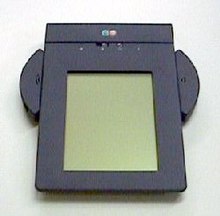
EO Personal Communicator (440) from AT&T

A personal digital assistant (PDA), also known as a palmtop computer, is a mobile device that functions as a personal information manager. Current PDAs often have the ability to connect to the Internet. A PDA has an electronic visual display, enabling it to include a web browser, but some newer models also have audio capabilities, enabling them to be used as mobile phones or portable media players. Many PDAs can access the Internet, intranets or extranets via Wi-Fi or Wireless Wide Area Networks. Many PDAs employ touchscreen technology.
The term PDA was first used on January 7, 1992 by Apple Computer CEO John Sculley at the Consumer Electronics Show in Las Vegas, Nevada, referring to the Apple Newton. In 1996, Nokia introduced the first mobile phone with full PDA functionality, the 9000 Communicator, which grew to become the world's best-selling PDA. The Communicator spawned a new category of mobile phones: the smartphone. Today, the vast majority of all PDAs are smartphones. Over 150 million smartphones are sold each year, while "stand-alone" PDAs without phone functionality sell only about 3 million units per year.
 Popular smartphone brands include HTC, Apple, Palm, Nokia N-Series, and RIM BlackBerry.

Typical features

A typical PDA has a touchscreen for entering data, a memory card slot for data storage, and IrDA, Bluetooth and/or Wi-Fi. However, some PDAs may not have a touch screen, using softkeys, a directional pad, and a numeric keypad or a thumb keyboard for input; this is typically seen on telephones that are incidentally PDAs.
In order to have the functions expected of a PDA, a device's software typically includes an appointment calendar, a to-do list, an address book for contacts, and some sort of memo (or "note") program. PDAs with wireless data connections also typically include an email client and a Web browser.

Touch screen
Many of the original PDAs, such as the Apple Newton and Palm Pilot, featured a touchscreen for user interaction, having only a few buttons—usually reserved for shortcuts to often-used programs. Touchscreen PDAs, including Windows Mobile devices, may have a detachable stylus to facilitate making selections. The user interacts with the device by tapping the screen to select buttons or issue commands, or by dragging a finger or the stylus on the screen to make selections or scroll.
Typical methods of entering text on touchscreen PDAs include:
A virtual keyboard, where a keyboard is shown on the touchscreen. Text is entered by tapping the on-screen keyboard with a finger or stylus.
An external keyboard connected via USB, Infrared, or Bluetooth. Some users may choose a chorded keyboard for one-handed use.
Handwriting recognition, where letters or words are written on the touchscreen, and the PDA converts the input to text. Recognition and computation of handwritten horizontal and vertical formulas, such as "1 + 2 =", may also be a feature.
Stroke recognition allows the user to make a predefined set of strokes on the touchscreen, sometimes in a special input area, representing the various characters to be input. The strokes are often simplified character shapes, making them easier for the device to recognize. One widely-known stroke recognition system is Palm's Graffiti).
Despite rigorous research and development projects, end-users experience mixed results with handwriting recognition systems. Some find it frustrating and inaccurate, while others are satisfied with the quality of the recognition.
Touchscreen PDAs intended for business use, such as the BlackBerry and Palm Treo, usually also full keyboards and scroll wheels or thumbwheels to facilitate data entry and navigation.
Many touchscreen PDAs support some form of external keyboard as well. Specialized folding keyboards, which offer a full-sized keyboard but collapse into a compact size for transport, are available for many models. External keyboards may attach to the PDA directly, using a cable, or may use wireless technology such as infrared or Bluetooth to connect to the PDA.
Newer PDAs, such as the Apple iPhone, Apple iPod Touch, HTC HD2, and Palm Pre, include more advanced forms of touchscreen that can register multiple touches simultaneously. These "multi-touch" displays allow for more sophisticated interfaces using various gestures entered with one or more fingers.

Memory cards
Although many early PDAs did not have memory card slots, now most have either some form of Secure Digital (SD) slot or a CompactFlash slot. Although originally designed for memory, Secure Digital Input/Output (SDIO) and CompactFlash cards are available that provide accessories like Wi-Fi or digital cameras, if the device can support them. Some PDAs also have a USB port, mainly for USB flash drives.[dubious – discuss] Some PDAs use microSD cards, which are electronically compatible with SD cards, but have a much smaller physical size.

Wired connectivity
While early PDAs connected to a user's personal computer via serial ports or another proprietary connection,[specify] many today connect via a USB cable. PDAs are not typically able to connect to each other via USB, as USB requires one machine to act as a "host," which isn't a typical PDA function.
Some early PDAs were able to connect to the Internet indirectly by means of an external modem connected via the PDA's serial port or "sync" connector, or directly by using an expansion card that provided an Ethernet port.

Wireless connectivity
Most modern PDAs have Bluetooth a popular wireless protocol for mobile devices. Bluetooth can be used to connect keyboards, headsets, GPS receivers, and other nearby accessories. It's also possible to transfer files between PDAs that have Bluetooth.
Many modern PDAs have Wi-Fi wireless network connectivity, and can connect to Wi-Fi hotspots.
All smartphones, and some other modern PDAs like the Apple iPod touch, can connect to Wireless Wide Area Networks, such as those provided by cellular telecommunications companies.
Older PDAs typically had an IrDA (infrared) port allowing short-range, line-of-sight wireless communication. Few current models use this technology, as it has been supplanted by Bluetooth and Wi-Fi. IrDA allows communication between two PDAs, or between a PDA and any device with an IrDA port or adapter. Some printers have IrDA receivers, allowing IrDA-equipped PDAs to print to them, if the PDA's operating system supports it. Most universal PDA keyboards use infrared technology because many older PDAs have it. Infrared technology is low-cost and has the advantage of being allowed aboard aircraft.

Synchronization
Most PDAs can synchronize their data with applications on a user's personal computer. This allows the user to update contact, schedule, or other information on their computer, using software such as Microsoft Outlook or ACT!, and have that same data transferred to PDA—or transfer updated information from the PDA back to the computer. This eliminates the need for the user to update their data in two places.
Synchronization also prevents the loss of information stored on the device if it is lost, stolen, or destroyed. When the PDA is repaired or replaced, it can be "re-synced" with the computer, restoring the user's data.
Some users find that data input is quicker on on their computer than on their PDA, since text input via a touchscreen or small-scale keyboard is slower than a full-size keyboard. Transferring data to a PDA via the computer is therefore a lot quicker than having to manually input all data on the handheld device.
Most PDAs come with the ability to synchronize to a computer. This is done through synchronization software provided with the handheld, or sometime with the computer's operating system. Examples of synchronization software include:
HotSync Manager, for Palm OS PDAs
Microsoft ActiveSync, used by Windows XP and older Windows operating systems to synchronize with Windows Mobile, Pocket PC, and Windows CE PDAs, as well as PDAs running iOS, Palm OS, and Symbian
Microsoft Windows Mobile Device Center for Windows Vista, which supports Microsoft Windows Mobile and Pocket PC devices.
Apple iTunes, used on Mac OS X and Microsoft Windows to sync iOS devices (such as the iPhone and iPod touch)
iSync, included with Mac OS X, can synchronize many SyncML-enabled PDAs
BlackBerry Desktop Software, used to sync BlackBerry devices
These programs allow the PDA to be synchronized with a personal information manager, which may be part of the computer's operating system, provided with the PDA, or sold separately by a third party. For example, the RIM BlackBerry comes with RIM's Desktop Manager program, which can synchronize to both Microsoft Outlook and ACT!.
Other PDAs come only with their own proprietary software. For example, some early Palm OS PDAs came only with Palm Desktop, while later Palm PDAs—such as the Treo 650—have the ability to sync to Palm Desktop aor Microsoft Outlook. Microsoft's ActiveSync and Windows Mobile Device Center only synchronize with Microsoft Outlook or a Microsoft Exchange server.
Third-party synchronization software is also available for some PDAs from companies like CommonTime and CompanionLink. Third-party software can be used to synchronize PDAs to other personal information managers that are not supported by the PDA manufacturers (for example, GoldMine and IBM Lotus Notes).

Wireless synchronization
Some PDAs can synchronize some or all of their data using their wireless networking capabilities, rather than having to be directly connected to a personal computer via a cable.
Apple iOS devices, like the iPhone, iPod Touch, and iPad, can use Apple's MobileMe subscription service to synchronize calendar, address book, mail account, Internet bookmark, and other data with one or more Macintosh or Windows computers using Wi-Fi or cellular data connections.
Palm's webOS smartphones primarily sync with the cloud. For example, if Gmail is used, information in contacts, email, and calendar can be synchronized between the phone and Google's servers.
RIM sells BlackBerry Enterprise Server to corporations so that corporate BlackBerry users can wirelessly synchronize their PDAs with the company's Microsoft Exchange Server, IBM Lotus Domino, or Novell GroupWise servers. Email, calendar entries, contacts, tasks, and memos kept on the company's server are automatically synchronized with the BlackBerry.

Automobile navigation

Some PDAs include Global Positioning System (GPS) receivers; this is particularly true of smartphones. Other PDAs are compatible with external GPS-receiver add-ons that use the PDA's processor and screen to display location information.
PDAs with GPS functionality can be used for automotive navigation. PDAs are increasingly being fitted as standard on new cars.
PDA-based GPS can also display traffic conditions, perform dynamic routing, and show known locations of roadside mobile radar guns. TomTom, Garmin, and iGO offer GPS navigation software for PDAs.


]Ruggedized PDAs

Some businesses and government organizations rely upon rugged PDAs, sometimes known as enterprise digital assistants (EDAs), for mobile data applications. EDAs often have extra features for data capture, such as barcode readers, radio-frequency identification (RFID) readers, magnetic stripe card readers, or smart card readers.
Typical applications include:
supply chain management in warehouses
package delivery
route accounting
medical treatment and recordkeeping in hospitals
facilities maintenance and management
parking enforcement
access control and security
capital asset maintenance
meter reading by utilities
"wireless waitress" applications in restaurants and hospitality venues


Medical and scientific uses

Many companies have developed PDA products aimed at the medical professions' unique needs, such as drug databases, treatment information, and medical news. Services such as AvantGo translate medical journals into PDA-readable formats. WardWatch organizes medical records, providing reminders of information such as the treatment regimens of patients and programs to doctors making ward rounds. Pendragon and Syware provide tools for conducting research with PDAs, allowing the user to enter data into a centralized database using their PDA. Microsoft Visual Studio and Sun Java also provide programming tools for developing survey instruments on the handheld. These development tools allow for integration with SQL databases that are stored on the handheld and can be synchronized with a desktop- or server-based database.
PDAs have been shown to aid diagnosis and drug selection and some studies[who?] have concluded that when patients use PDAs to record their symptoms, they communicate more effectively with hospitals during follow-up visits.
The development of Sensor Web technology may lead to wearable bodily sensors to monitor ongoing conditions, like diabetes or epilepsy, which would alert patients and doctors when treatment is required using wireless communication and PDAs.

Educational uses

As mobile technology becomes more common, it is increasingly being used as a learning tool. Some educational institutions have embraced M-Learning, integrating PDAs into their teaching practices.
PDAs and handheld devices are allowed in many classrooms for digital note-taking. Students can spell-check, modify, and amend their class notes on the PDA. Some educators distribute course material through the Internet or infrared file-sharing functions of the PDA. Textbook publishers have begun to release e-books, or electronic textbooks, which can be uploaded directly to a PDA, reducing the number of textbooks students must carry.
Software companies have developed PDA programs to meet the instructional needs of educational institutions, such as dictionaries, thesauri, word processing software, encyclopedias, and digital lesson planners.

Recreational uses
PDAs may be used by music enthusiasts to play a variety of music file formats. Many PDAs include the functionality of an MP3 player.
Road rally enthusiasts can use PDAs to calculate distance, speed, and time. This information may be used for navigation, or the PDA's GPS functions can be used for navigation.
Underwater divers can use PDAs to plan breathing gas mixtures and decompression schedules using software such as "V-Planner."


PDAs for people with disabilities

PDAs offer varying degrees of accessibility for people with differing abilities, based on the particular device and service. People with vision, hearing, mobility, or speech impairments may be able to use PDAs on a limited basis. This use may be enhanced by accessibility software (e.g., speech recognition for verbal input instead of manual input). Universal design is relevant to PDAs as well as other technology, and a viable solution for many user-access issues, though it has yet to be consistently integrated into the design of popular consumer PDA devices.
PDAs are useful for people with traumatic brain injury or posttraumatic stress disorder, as seen in troops returning home from the Iraq War and Operation Enduring Freedom. PDAs help address memory problems, helping affected people with daily life organization and reminders. As of quite recently[when?], the Department of Veterans' Affairs has issued thousands of PDAs to troops who need them. Occupational therapists have taken on a crucial role within this population helping these veterans return to the normality of life they once had.


(source:wikipedia)
